 Avg. 2 min read
 Activities Log
Overview
The Activities Log lets you view and interact with the change history of your Hello Retail setup. This guide explains the Activities Log user interface and how to use it.
You do not need to enable this feature. Changes to your setup are tracked automatically and categorized by type.
Activities Log Page
From the main entry shown below, you can view all activities recorded for the current domain.
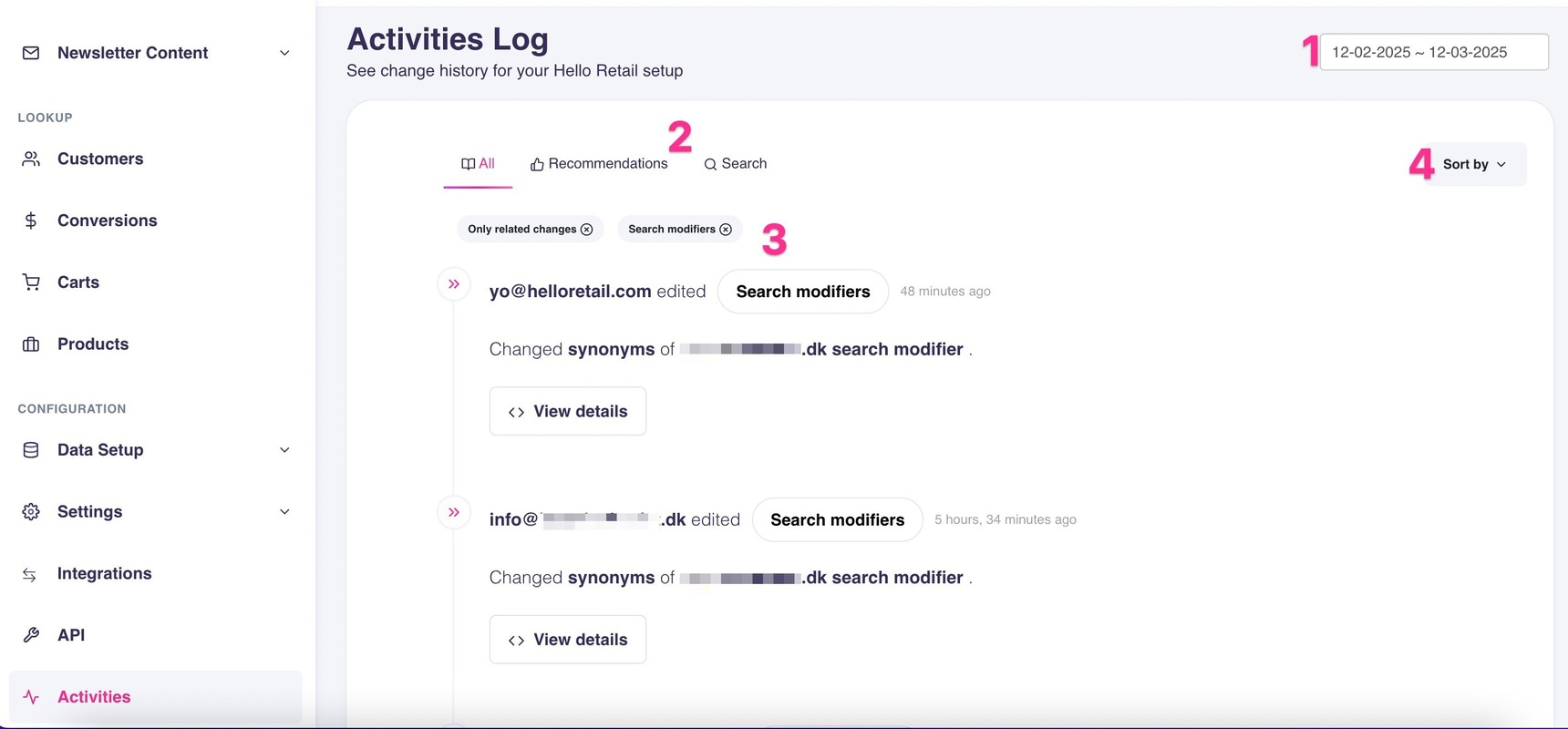
- Use the date picker to select a date range. The logs update automatically. The selected dates are inclusive.
- Use the filter tabs to filter logs by resource group. Select All to clear resource filters.
- To filter by a specific resource type, click its pill (>>) in a log entry. The selected resource type appears as a filter pill that you can remove by clicking it.
- Use the sorting dropdown to reorder logs by criteria such as Newest or Oldest.
When more logs exist than can fit on one screen, a Load More button appears at the bottom of the list. Select it to load additional logs. Each log entry is displayed as a card in the list.
Most actions performed through the dashboard are logged. Common categories include: Changes to the setup for all types of feeds (Product, Category, Orders, Permissions) Changes to the configuration and algorithms of Search, Recommendations, Pages, Newsletters, Triggered Emails, and Retail Media.