Avg. 3 min read
 Google Analytics Events
On-site product recommendations and Search from Hello Retail can be configured to send events to Google Analytics. When enabled, the Hello Retail script looks for an existing Google Analytics tracker on your site and uses it to send events. You can read more about Event Tracking with Google Analytics here.
Finding a Tracker
The script first looks for a global object named either __gaTracker or ga. If found, it calls getAll() on that object and uses the first tracker returned.
If neither __gaTracker nor ga is found, the script looks for the legacy Google Analytics tracker by checking for an object named _gaq.
Note
Load the Hello Retail script after the Google Analytics script so the tracker is available when Hello Retail initializes.
Sending Events
Product recommendations send events when a recommendation is viewed and when a product in the recommendation is clicked. Search boxes send events when the search box is used and when a search result is clicked. The category, action, and label for each event can be configured.
Recommendation view events are sent as non-interaction events. The other events (clicks and searches) are sent as interaction events.
Click events for product recommendations and search results are sent on the destination product page after navigation, not on the click itself.
Examples
When a product recommendation on the front page is viewed, the script can be configured to send an event like this
ga("send", "event", "Addwish", "Product box view", "Frontpage", {'nonInteraction' : 1});
When a product in the recommendation is clicked, the script will send an event like this
ga("send", "event", "Addwish", "Product box click", "Frontpage", {'nonInteraction' : 0});
Where to Find Event Info in Google Analytics
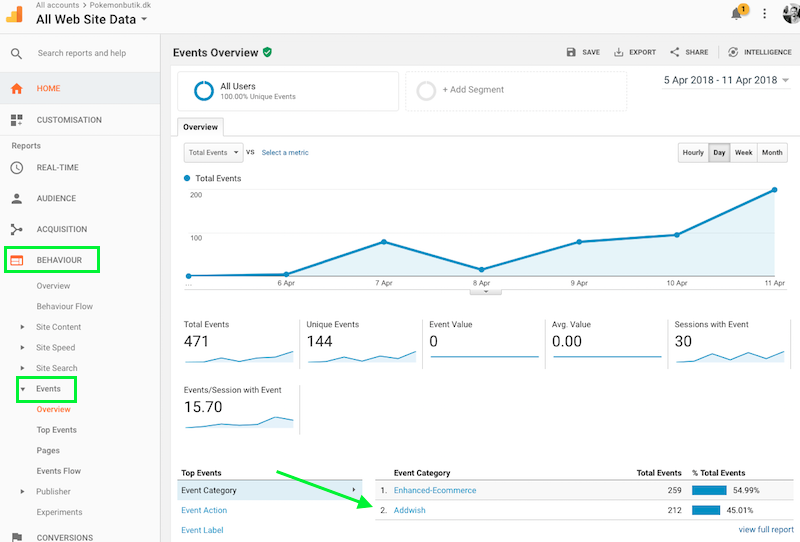
If you navigate to Behavior > Events > Overview in Google Analytics, you will find detailed event statistics, broken down by "Category" (this defaults to Hello Retail), "Action" (for example, click or view, grouped as Search or Recommendations), and "Label" (the name of the search configuration or product recommendation box):