 Avg. 8 min read
 Hello Retail API
For regularly updated information on the current state of the Hello Retail API, as well as a complete list of the methods available in the SDK, we refer to this source: developer.helloretail.com/sdk/
This article is not an exhaustive reference. It explains when it makes sense to use our API and when a managed implementation is a better fit. The objective is to make it clear if your shop should invest development time in building with the Hello Retail features yourself, or if you will benefit more from a standardized setup managed by Hello Retail.
Introduction
Very broadly speaking, the tradeoff between a managed solution and an API-based setup is a choice between ease of use and how smoothly the individual features, like Search and Recommendations, can be integrated into your webshop.
If you want to utilize the features and data processing of Hello Retail to increase revenue, but do not want to configure every detail, we can set up our best practice. You decide how the elements should look and where they should be placed.
With a managed solution, Hello Retail handles the layout and insertion of elements on your webshop. These are invoked through JavaScript, with a Liquid template rendering the HTML. As with all services that run JavaScript, a minor delay between when the page has finished loading and when the elements are inserted is unavoidable. Another limitation is that our Implementation Team and Tech Support must be able to replicate and maintain functions like add to basket, compare products, personal wishlist, and similar actions you may have on your webshop. This must be done in a way that can execute inside the Liquid templates that power most of Hello Retail's frontend rendering.
Put differently, if your webshop runs complex functionality and you are not able to provide a working frontend implementation that Hello Retail can copy, you may only be able to retain this functionality in Hello Retail features if your developers use our API to return raw JSON product data and then handle it the same way as products on your own webshop/frontend.
Why a managed solution?
The benefit of this approach is that you do not need to spend time on complex configuration or tracking. You can rely on our experience with what works. Hello Retail will output the elements styled to match your webshop. When you want changes, contact our support, and we will handle them for you, provided the request is feasible.
Why the need for an API based setup?
On the other hand, you should consider using our API if the following applies to your webshop.
You are running complex functionality that is not exclusively defined frontend, but may require insight into and access to your own tools and databases.
The Recommendations, Search or Pages solution needs to be visually present and ready on your website at page load, with no extra delay. In most cases this delay is small, but performance requirements vary.
You require that Hello Retail should work with, or be supplemented by, other types of data than what we collect with our standard cookie-based tracking. This tracking is listed in our documentation as a requirement for a functional setup.
If you need more control over the behavior of the setup than what is practical with our managed solution. While this is hard to define in strict terms, examples include:
Show different prices in the search result based on different customer groups, or other visitor segmentation.
Show different types of products in Recommendations if people visit the shop (one domain) from different parts of the world.
Show free gift products on a category page if the visitor arrives by clicking a link in your newsletter.
Two types of API solutions
When deciding what approach best suits your requirements, note that we provide two fundamentally different ways of using our API. The difference is not necessarily large from a purely technical perspective, but in terms of having a predefined framework for the recommendation-part of your setup, the options should be considered. This difference also applies when using the API for other features like Search and Pages, but for those the difference is more a matter of technical preference.
Managed Recommendations through API
In this approach, you rely on Recommendations defined in the Hello Retail backend that run specific algorithms. You call the API with a specific box-key that points to the Recommendation you want items returned from.
In a simplified scenario, someone at Hello Retail has created a Recommendation intended to show retargeted products on the front page and a Recommendation for a given product page that shows related products priced lower than the viewed item. To get products returned from the system, you call the box that matches the setup you need. Typically, you also pass parameters with the request, such as the product-url for which the system should find relations.
The overall process involves someone—typically an Implementation Specialist at Hello Retail—defining what the individual box-keys should do, so a dialogue about what you want to achieve from the setup is required before anything can be configured.
When specific boxes are involved in the API setup, it is also possible to return the Liquid template itself for the individual Recommendations.
Managed recommendations through the API allow flexibility: the elements can be present when your page initializes, and you can style the returned data as you see fit. However, if you need to change the algorithms defined in each box dynamically, you may get more freedom by skipping predefined boxes and calling the API without that anchor, as described below.
Unmanaged Recommendations through API
It is also possible to call our API and, in the request itself, define what it should do, what parameters it should consider, and what filtering should be applied to the returned data. This approach offers the highest flexibility, but it does require substantial knowledge of the internal workings of the Hello Retail system to be practical. As there will be no parts of the setup defined inside the Hello Retail backend (all calls take place on your side), there is also no clear registration of what you aim to achieve. For this reason, our technical staff cannot provide practical support for the setup, so any developer resources must be your own. This option is therefore only fully embraced by a handful of the many webshops using Hello Retail.
The technical differences between using the API with a managed vs unmanaged setup are explained in greater detail in the documentation
Website UUID and API key in the dashboard
In the context of either calling the Hello Retail API or scheduling feed runs in Hello Retail, you will need either the UUID of your website(s) or an API key. Both are available in the dashboard:
Website unique id (UUID)
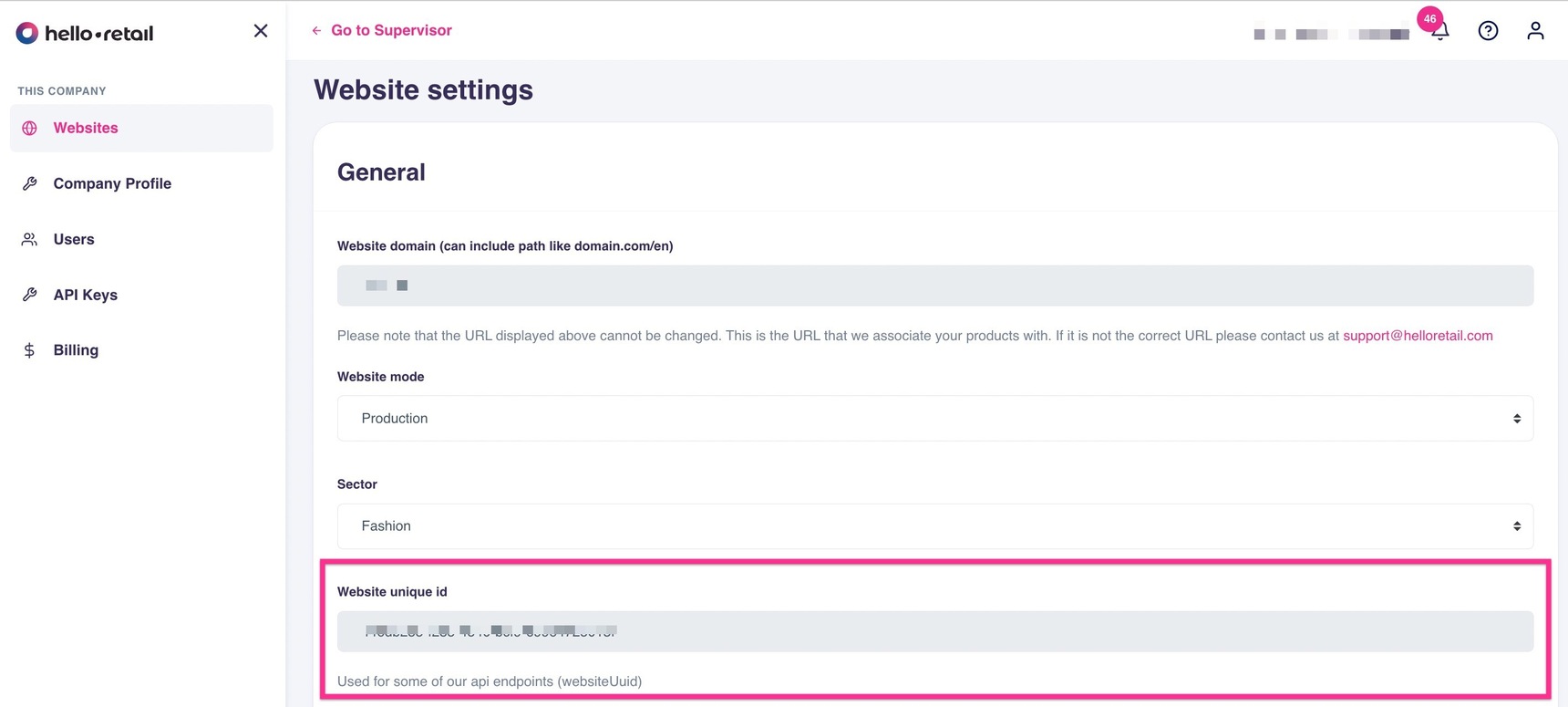
This is available under Websites > Go to Settings
API-key
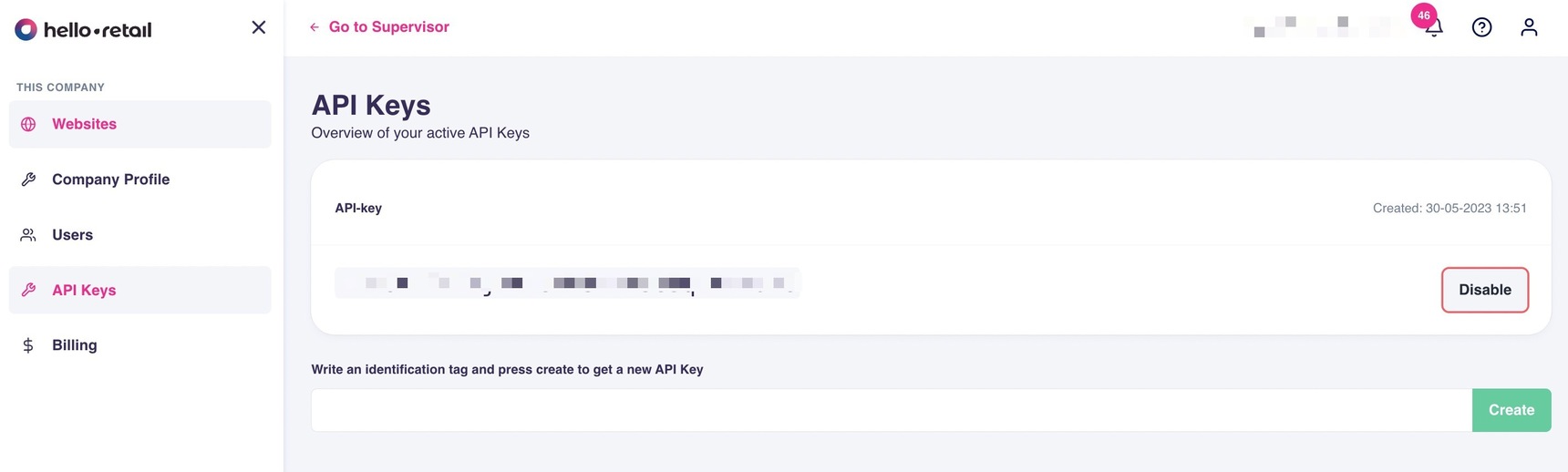
This is available in the top-level section of the dashboard as well. When setting this up initially, generate a new value by clicking the 'Create' button.
If you have any questions about this guide, please contact Support or your designated Account Manager.