 Avg. 2 min read
 Website's Product Grouping
What is Product Grouping
The concept of Product Grouping is closely related to variant products (often called configurable products): a single product with multiple variants, such as a sofa available in several colors.
In Hello Retail, Product Grouping lets you control de-duplication so that not every variant appears in the same recommendation, email, search, or page result.
If you set Product Grouping to "title", only the first product with a given title will be returned, even if more products share that title. The remaining products with the same title are not returned.
If you set Product Grouping to "title" and "imgUrl", only the first product that has the same title and the same image will be returned.
Some products share a title but use different images (for example, a sofa with multiple colors). Use the Product Grouping settings to decide whether all variants should appear in the results or only the first.
If title or image is not sufficient for your use case, select additional fields that better match how you want variants grouped.
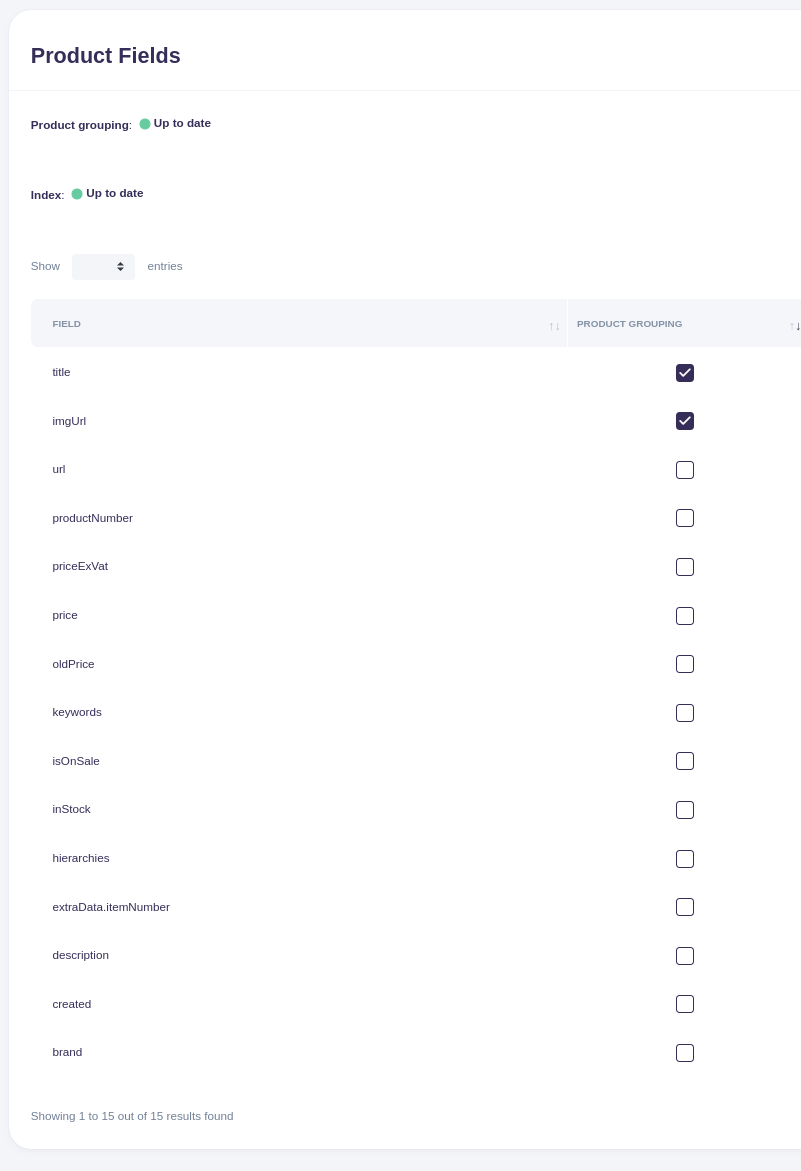
[Image showing the product grouping configuration table]
Configuring Product Grouping
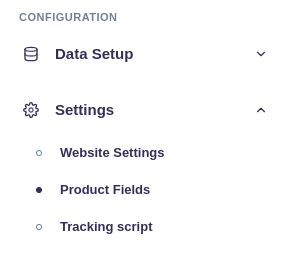
First, navigate to the Product Fields page in the left menu bar:
Select or clear the fields you want to use for product grouping, then click the "Save" button at the bottom of the screen.
Changes to Product Grouping take effect almost immediately.
Default values
The default values for Product Grouping are "title" and "imgUrl". This provides a good balance for Search and Recommendations, where only one product with the same title and the exact same image will appear in results.