 Avg. 1 min read
 Newsletter Content and Google Analytics (UTM parameters)
This guide explains how Hello Retail sets UTM parameters for Newsletter Content campaigns.
By default, Hello Retail adds UTM parameters to your Newsletter Content campaigns, whether you are using Manual, Rolling, or Auto campaigns.
UTM Attributes
Newsletter Content campaigns apply the following UTM parameters to links:
| Parameter | Value |
|---|---|
source | helloretail |
medium | email |
campaign | "the actual id of the individual campaign" |
You can optionally override the medium and campaign parameters at the campaign level. The source parameter is fixed.
Note
Do not override UTM parameters for Auto campaigns. Using a fixed campaign value makes all future auto-created campaigns share the same campaign identifier, which prevents distinguishing campaigns.
Overwrite UTM Parameter
If needed, you can overwrite UTM parameters in the final step (Code snippet) of the campaign creation process:
- Click the "UTM settings" button where you can overwrite the
mediumandcampaignparameters:
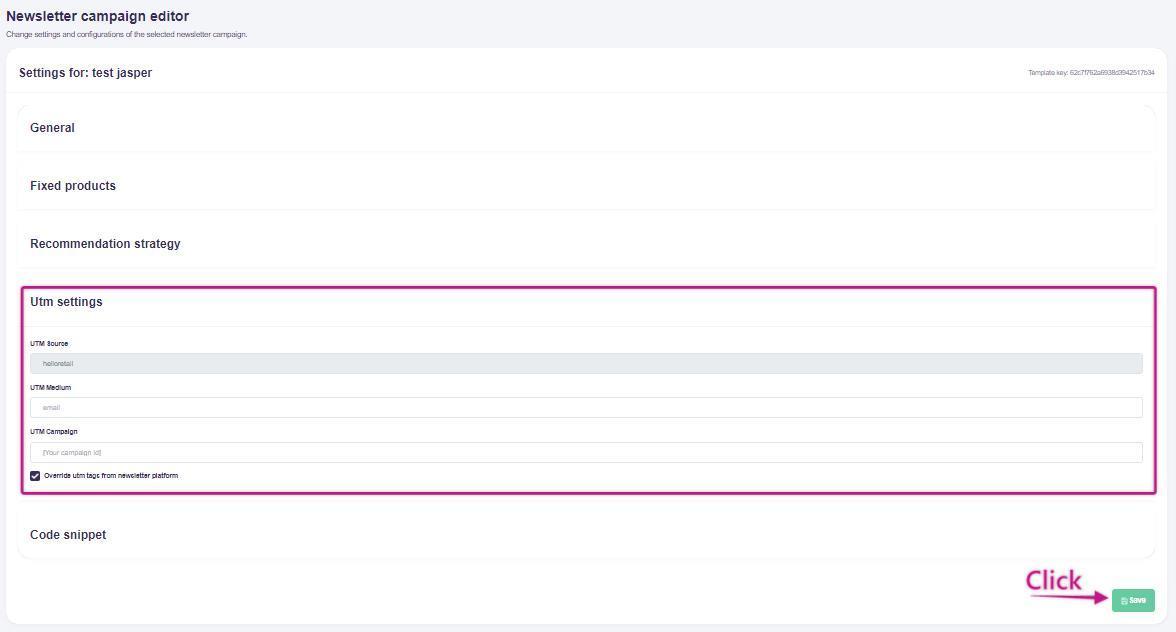
- Remember to click the "Save" button to apply your changes.