Avg. 2 min read
 API Integration (JSON Response)
If you are starting your Pages setup, read this guide first. This page covers API integration using JSON responses.
Requirements & Prerequisites
This is the most flexible integration, but it requires more implementation. Your application calls the Hello Retail Pages API and receives product data and available filters as JSON.
You are responsible for rendering the product listing UI, including filter controls, sorting, pagination, and product cards.
Read more about the Pages API in our developer documentation.
Example
Below is a minimal PHP example for a WooCommerce shop. It is split into two parts.
1. The first part reads parameters from the URL and sends the API call:
<?php
    $key = '621f84dbd901557944cb4b36';
    $breadcrumbs = (new WC_Breadcrumb())->generate();
    $baseFilter = ['hierarchies' => []];
    foreach($breadcrumbs as $b) {
        $baseFilter['hierarchies'][] = $b[0];
    }
    $trackingUserId = $_COOKIE['hello_retail_id'];
    $filters = [];
    if (isset($_GET['filters'])) {
        $filters = array_filter($_GET['filters']);
    }
    $sorting = [];
    if (isset($_GET['sorting'])) {
        $sorting = array_filter([$_GET['sorting']]);
    }
    $start = 0;
    $count = 24;
    if (isset($_GET["page"])) {
        $start = ($_GET["page"] - 1) * $count;
    }

    $req = [
        "url" => $_SERVER["REQUEST_URI"],
        "layout" =>true,
        "products" => [
            "start" => $start,
            "count" => $count,
            "filters" => $filters,
            "sorting" => $sorting,
            "fields" => ["title", "url", "imgUrl", "price"]
        ],
        "params" => [  "filters" => $baseFilter  ],
        "firstLoad" => true,
        "trackingUserId" => $trackingUserId,
        "format" => "json"
    ];

    $opts = [
        "http" => [
            'method' => 'POST',
            'header' => 'Content-type: application/json',
            'content' => json_encode($req)
        ],
        "ssl"=>[
            "verify_peer"=>false,
            "verify_peer_name"=>false
        ]
    ];

    $context = stream_context_create($opts);
    $content = file_get_contents('https://core.helloretail.com/serve/pages/' . $key, false, $context);
    $content = json_decode($content, true);
?>
2. The second part builds a basic UI:
<?php if ($content): ?>

<style>
        .product {
            width: 200px;
            float: left;
            border: 1px solid #ddd;
            margin: 10px 10px;
            padding: 10px 10px;
            text-align: center;
        }
        .product img {
            width: 100%
        }
        .input {
            margin: 5px 10px;
        }
        .filter, .sorting {
            margin: 10px 0px;
        }
</style>

<form method="GET">
    <div class="filter">
        Filters:
        <?php foreach($content['products']['filters'] as $filter): ?>
            <span class="input">
                <?=htmlspecialchars($filter['settings']['title'])?>
                <select name="filters[]">
                    <option value="">-</option>
                     <?php foreach($filter['values'] as $value): ?>
                         <option value="<?=htmlspecialchars($value['query'])?>"<?=in_array($value['query'], $filters) ? 'selected' : ''?>  ><?=str_replace("$", " > ", htmlspecialchars(trim($value['title'], "$")))?> (<?=htmlspecialchars($value['count'])?>)
                         </option>
                     <?php endforeach ?>
                 </select>
             </span>
        <?php endforeach ?>
    </div>
    <div class="sorting">
        Sort by:
        <span class="input">
            <select name="sorting">
                <option value="">-</option>
                 <?php foreach($content['products']['sorting'] as $sortingOption): ?>
                     <option value="<?=htmlspecialchars($sortingOption['descending']['query'])?>"  <?=in_array($sortingOption['descending']['query'], $sorting) ? 'selected' : ''?>>  <?=htmlspecialchars($sortingOption['settings']['descendingText'])?>  </option>  <option value="<?=htmlspecialchars($sortingOption['ascending']['query'])?>"  <?=in_array($sortingOption['ascending']['query'], $sorting) ? 'selected' : ''?>>  <?=htmlspecialchars($sortingOption['settings']['ascendingText'])?>
                     </option>
                 <?php endforeach ?>
             </select>
        </span>
    </div>
    <input type="submit" value="Apply">
</form>
<p>Showing <?=htmlspecialchars($content['products']['count'])?> products of <?=htmlspecialchars($content['products']['total'])?> total</p>
    <?php foreach($content['products']['result'] as $product):?>
        <div class="product">
            <a href="<?=htmlspecialchars($product['url'])?>">
                <img src="<?=htmlspecialchars($product['imgUrl'])?>">
                <div><?=htmlspecialchars($product['title'])?></div>
                <div>$<?=htmlspecialchars(number_format($product['price'], 2))?></div>
            </a>
        </div>
    <?php endforeach ?>
<?php endif ?>
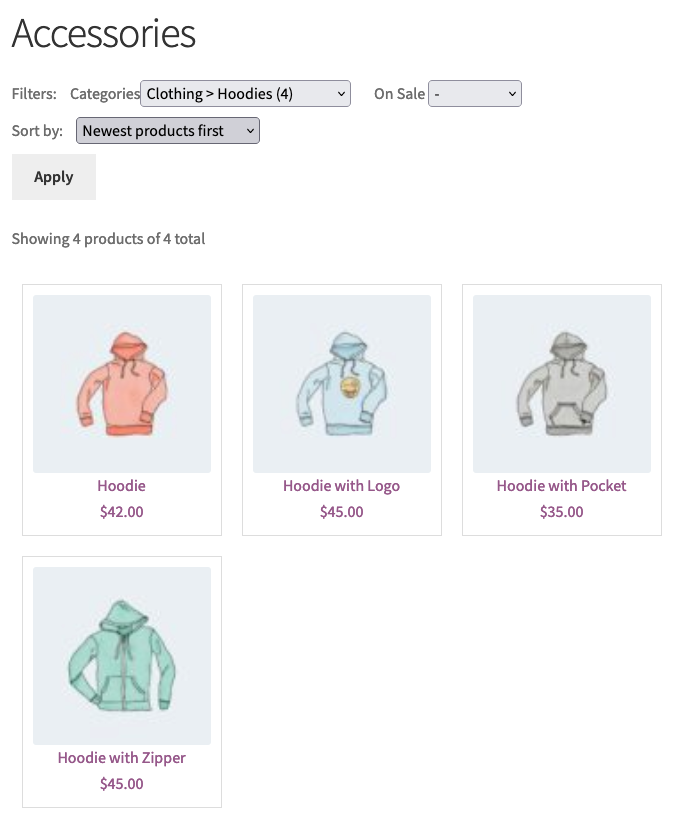
The code renders a simple category page similar to the screenshot below. It demonstrates the basic API flow, but you should extend the UI for production to match your design and feature requirements.