 Avg. 2 min read
 Nordisk E-Handel Installation Guide
This guide explains how to set up Hello Retail on Nordisk E-Handel.
Contact the Platform
Contact your platform provider to install the Hello Retail plugin and enable conversion tracking on the checkout success page. Older versions of the integration required a Hello Retail Partner ID. This is no longer required.
Create a Blank Page for Search Results
The following section is only relevant for setups for a full search.
Follow these steps to install your search results on a blank page in Nordisk E-Handel:
- Start by logging into your Nordisk E-Handel admin account.
- Navigate to Sidor > Sidor.
- Choose Add new page (Skapa ny sida).
-
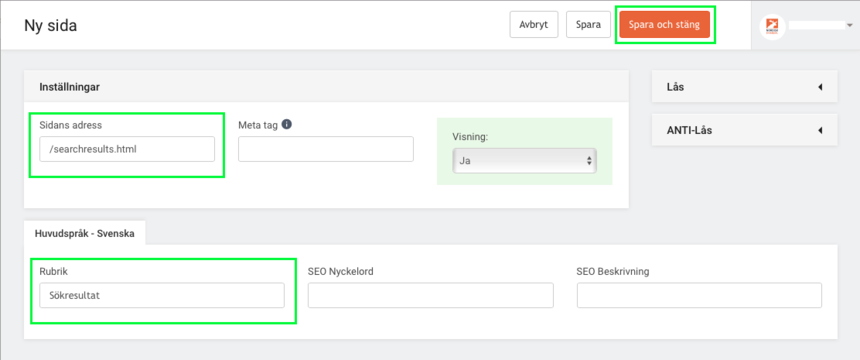
Give the page a suitable address and headline, for example /searchresults.html and Sökresultat.
-
Share the URL of this new page with Hello Retail to finalize the setup of Search.
Configure Webshop
After the plugin is installed and the onboarding flow is complete, configure your webshop in Hello Retail. Read this guide to complete the configuration: