 Avg. 3 min read
 Remove old Shopify scripts
Hello Retail has moved to pixel-based tracking for carts and conversions.
If you have a previous install, remove the legacy scripts from your store and then follow the new install guide.
Removing the Hello Retail script:
Start by logging in to the Shopify admin for your store. If needed, use the login page: shopify.com/login.
- In the Shopify admin, open the left-hand menu and click Online Store.

- From the submenu, click Themes.

- On the right-hand side, locate your live theme (for example, Debut) and click the Actions drop-down.

- From the drop-down menu, click Edit code.

- In the left-hand file tree, open the Layout folder and click theme.liquid. The code editor will open.

-
In the editor, locate and remove the following code:
Note
If you do not find this snippet, your store may use an older integration. Remove any code referencing Hello Retail, Addwish, or awaddgift.
<script async src="https://helloretailcdn.com/helloretail.js"></script> <script> window.hrq = window.hrq || []; hrq.push(['init', {}]); {% assign HelloRetailCartContentsRecreate = '' %} {% assign HelloRetailCartProductNumbers = '' %} {% for item in cart.items %} {% assign HelloRetailCartContentsRecreate = HelloRetailCartContentsRecreate | append: item.variant_id | append:":" | append: item.quantity | append: "," %} {% assign HelloRetailCartProductNumbers = HelloRetailCartProductNumbers | append: item.product_id | append: "," %} {% endfor %} hrq.push(["setCart", { total: {{ cart.total_price | divided_by: 100.0 }}, url: "{{shop.url}}/cart/{{HelloRetailCartContentsRecreate}}", productNumbers: [{{HelloRetailCartProductNumbers}}] }]); [hr_preMoney, hr_postMoney] = "{{ 1 | money_with_currency }}".split(/[0-9,.']+/); </script> -
Click Save at the top of the editor.

Removing the Hello Retail Conversion Script:
- While logged in as Admin, open the left-hand menu and click Settings at the bottom of the screen. The Settings panel opens.
- Click Checkout.
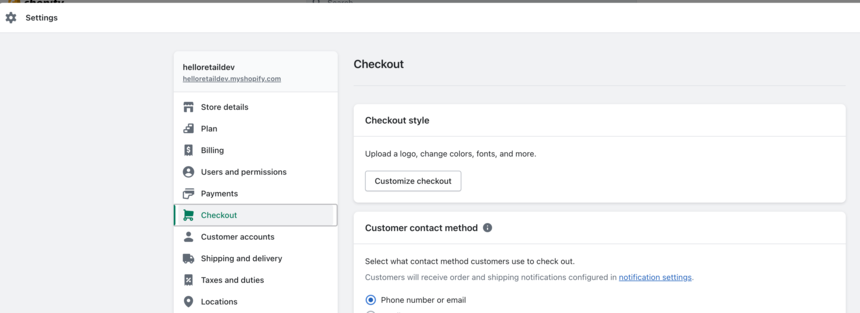
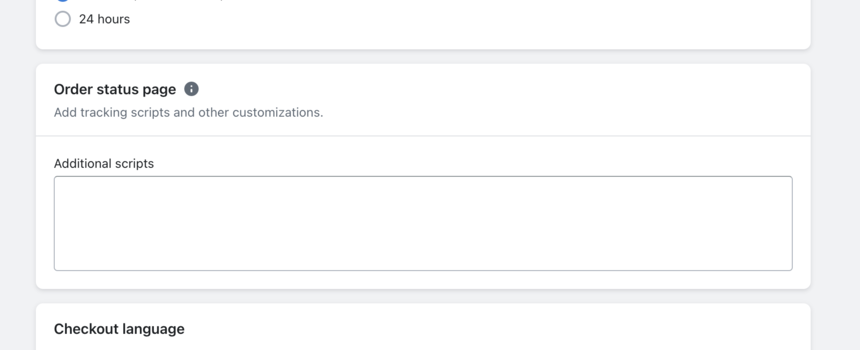
- Scroll to the Order status page section and locate the Additional scripts input field.
-
Find and remove the following snippet from the Additional scripts field:
<script async src="https://helloretailcdn.com/helloretail.js"></script>
<script type="text/javascript">
    var HelloRetailProductNumbers = [];
    Shopify.checkout.line_items.forEach((item) => HelloRetailProductNumbers.push(item.product_id));
    var HelloRetailPrice = Shopify.checkout.subtotal_price;
    // the if statement below will make sure we always track the order total
    // in the shops base currency.
    // If you have a setup with multiple domains like domain.com/se and domain.com/dk
    // and dont support switching currencies within each of them individually,
    // then you can opt to remove this if statement
    // and have conversions tracked in the shops' presentment currencies.
    if (Shopify.checkout.presentment_currency != Shopify.checkout.currency) {
        var HelloRetailShippingRate = 0;
        if (Shopify.checkout.shipping_rate) {
            HelloRetailShippingRate = Number(Shopify.checkout.shipping_rate.handle.split("-").pop());
        };
        var HelloRetailTotalPrice = Number(Shopify.checkout.total_price_set.shop_money.amount);
        if (HelloRetailShippingRate && HelloRetailTotalPrice) {
            HelloRetailPrice = (HelloRetailTotalPrice - HelloRetailShippingRate).toFixed(2);
        };
    };
    window.hrq = window.hrq || [];
    hrq.push(['init', {}]);
    hrq.push(["trackConversion", {
        total: HelloRetailPrice,
        orderNumber: Shopify.checkout.order_id,
        email: Shopify.checkout.email,
        productNumbers: HelloRetailProductNumbers
    }]);
</script>
Note
If you do not find a snippet here, your store may use an older integration. Remove any code referencing Hello Retail, Addwish, or awaddgift.
Note
If the field is grayed out, your store uses Shopify Checkout Extensibility. Additional scripts are no longer executed and can be ignored.
-
Click Save at the top of the page.
