 Avg. 12 min read
Shopify Installation Guide
In this guide, you will set up Hello Retail with Shopify, including API credentials, tracking and conversion scripts, and a blank page for search.
Creating API credentials for Hello Retail
Shopify Partners, Collaborators and Agencies
Hello Retail authenticates to Shopify Admin API using the Client Credentials Grant through a custom app.
It is important to note that Shopify only allows this authentication process when the custom app is created within the same Shopify organization as it is installed in.
For this reason, it is not going to work if the app is created in the partner dashboard of an agency and then shared through a custom distribution install link.
If the store owner feels comfortable doing so, the easiest approach is therefore to let them create and install the app.
If a collaborator or agency needs to be involved, they must be invited to join the Shopify organization and granted the App Developer role. Only then will they be allowed to create the app within the store organization.
The API credentials allow Hello Retail to synchronize your shop's products and categories with our database to keep content up to date. They are also used to read order data for product relations and services such as triggered emails.
To provide us with API credentials, create a custom app in your Shopify Dev Dashboard and install it on the stores you want to set up with Hello Retail. Notice, to gain access to the Dev Dashboard you must be the store owner or have either the administrator or app-developer role for the organization. If needed, you can read Shopify's documentation on custom apps here.
Headless or custom storefronts
Headless and custom storefronts aren't supported for the Product Agents free trial. Contact us to discuss your setup.
Watch a short video that walks through creating and installing the app, or follow the written steps below.
Follow the steps below:
- Log in to your Shopify account.
-
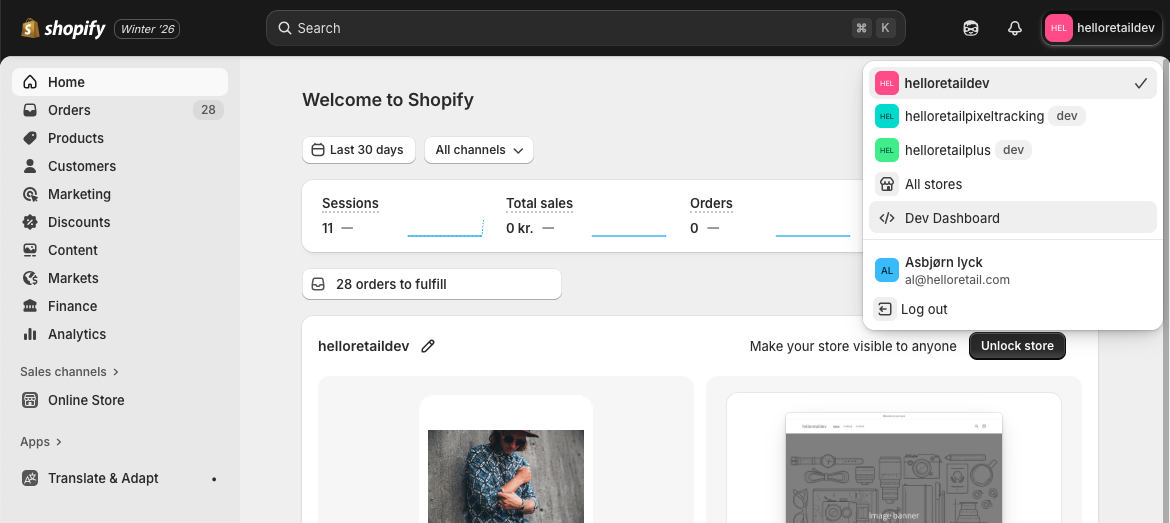
On the dashboard, click on the shop icon in the top right corner. In there click Dev Dashboard
-
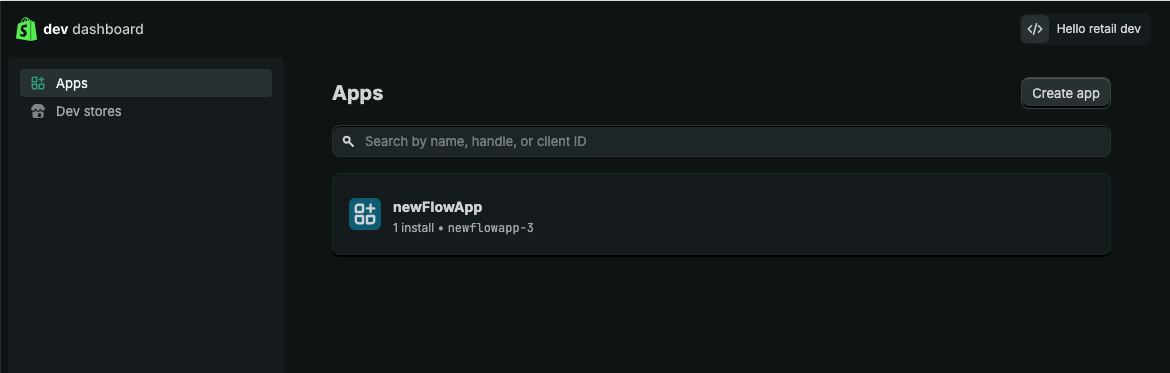
In this view, click Create New App.
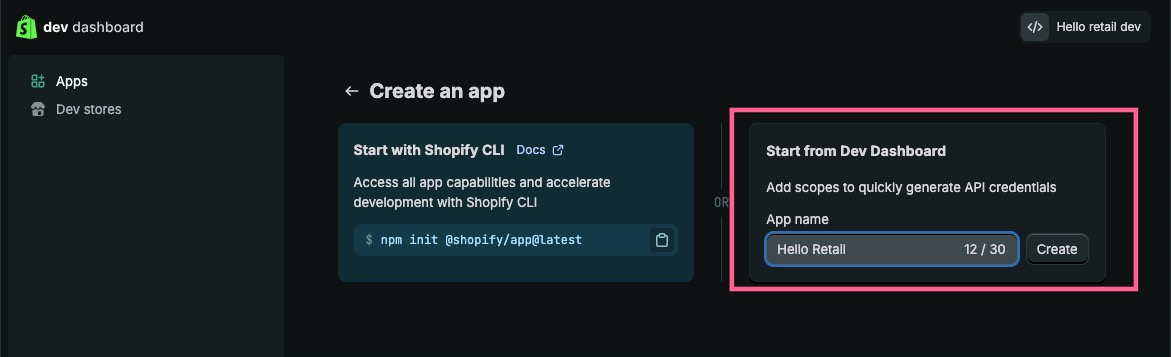
- Choose the option Start from Dev Dashboard and give your app a name.
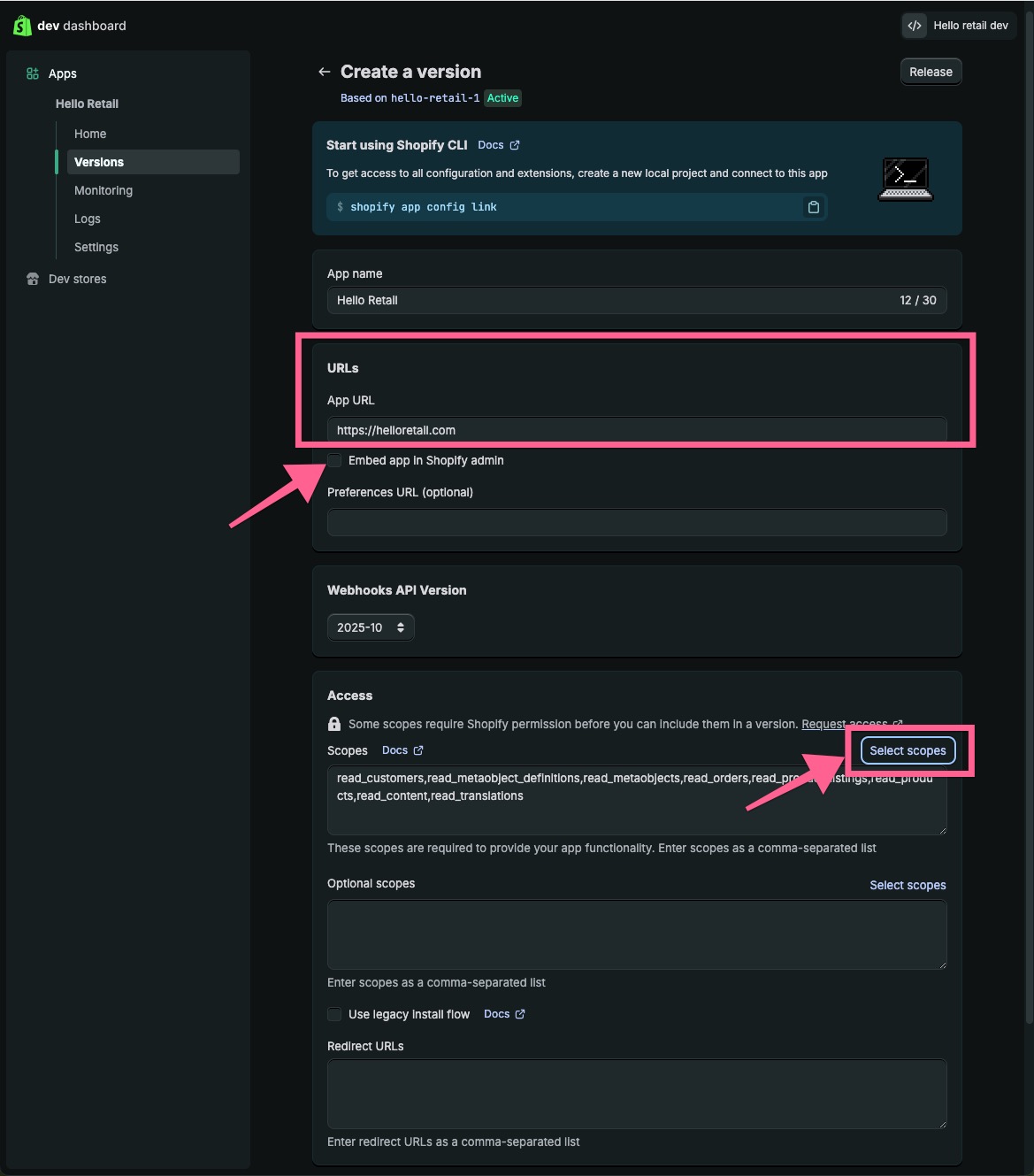
- In the following view, add https://helloretail.com/ as an app URL, deselect Embed Shop in Shopify Admin and finally click on Select Scopes.
-
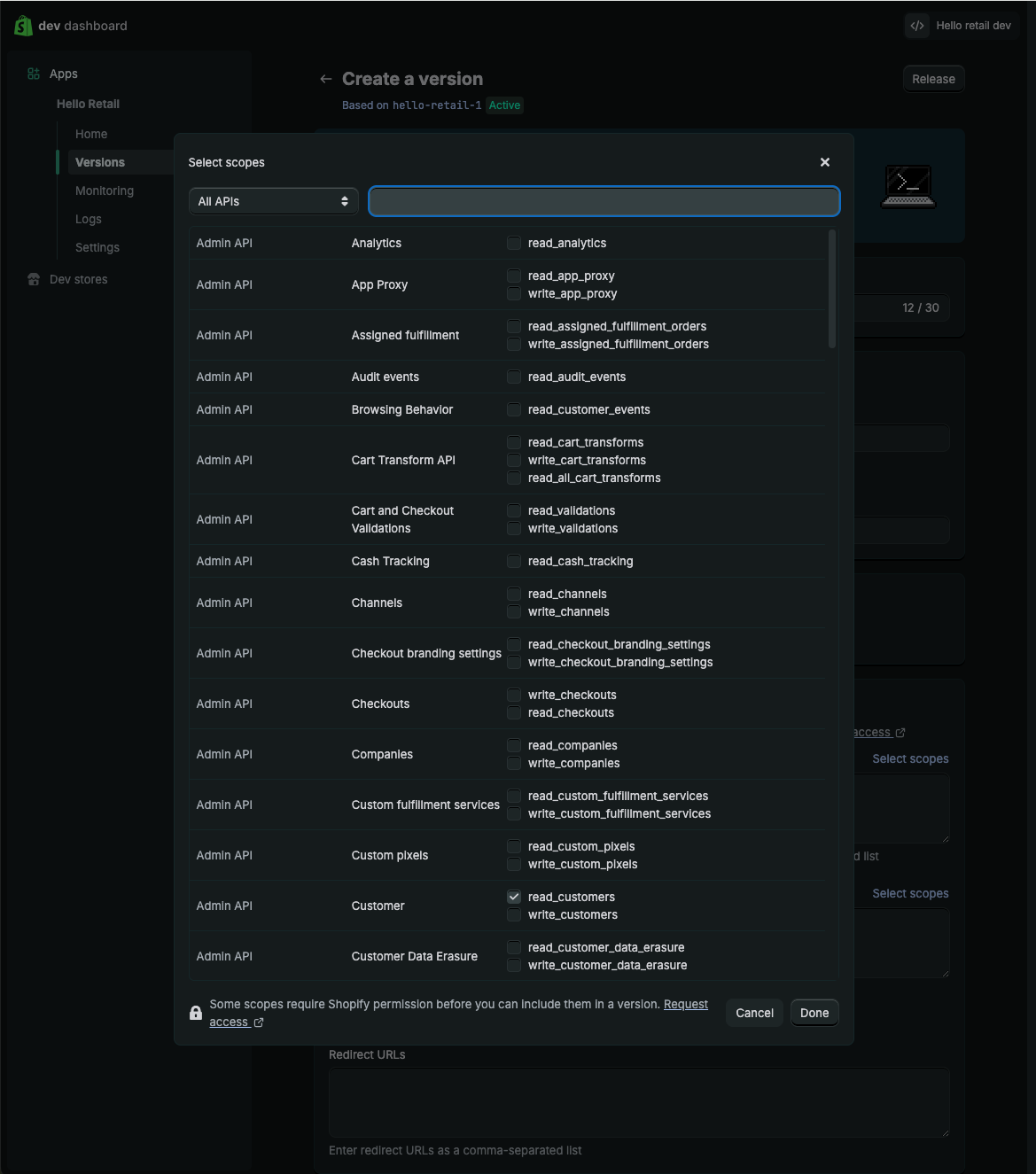
In the popup, search for the following scopes and activate them:
- read_orders
- read_product_listings
- read_products
- read_content
- read_customers
- read_files
- read_metaobject_definitions
- read_metaobjects
- read_translations
 7. Click Release on the top right corner of the page, which will open the following pop-up.
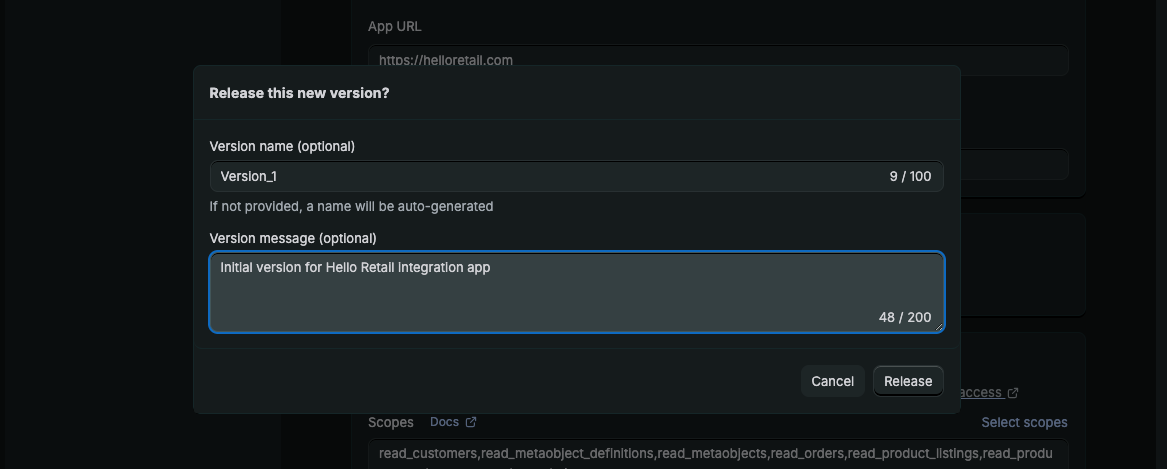
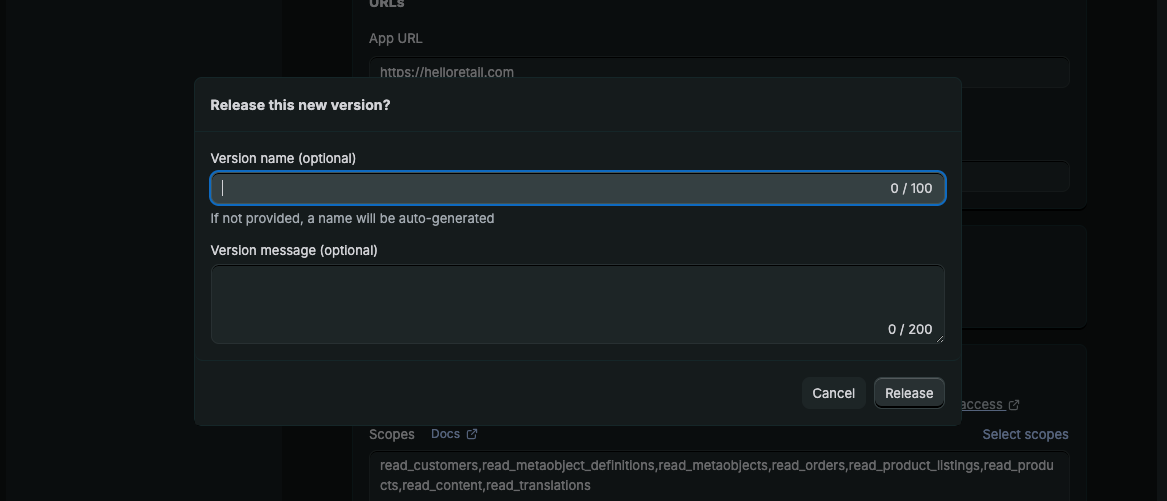 8. Optionally you can add a Name and message to the first version before releasing it.
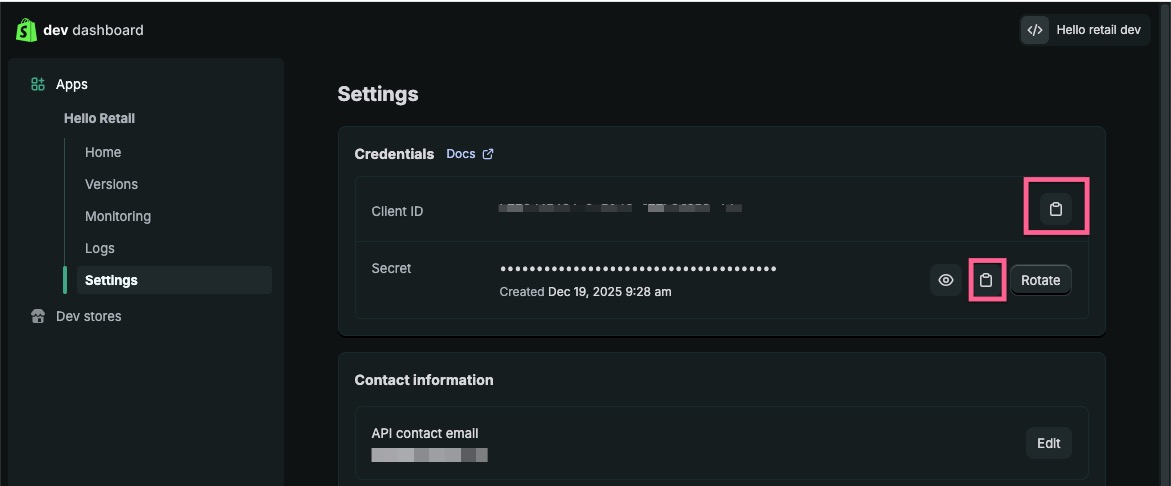
  9. After that navigate to Settings, where you will find the Client ID and Secret, which you will need within Hello Retail to authenticate the app. Keep this tab open, you'll need both values in the next step.
 10. Navigate to Home and click on Install App.
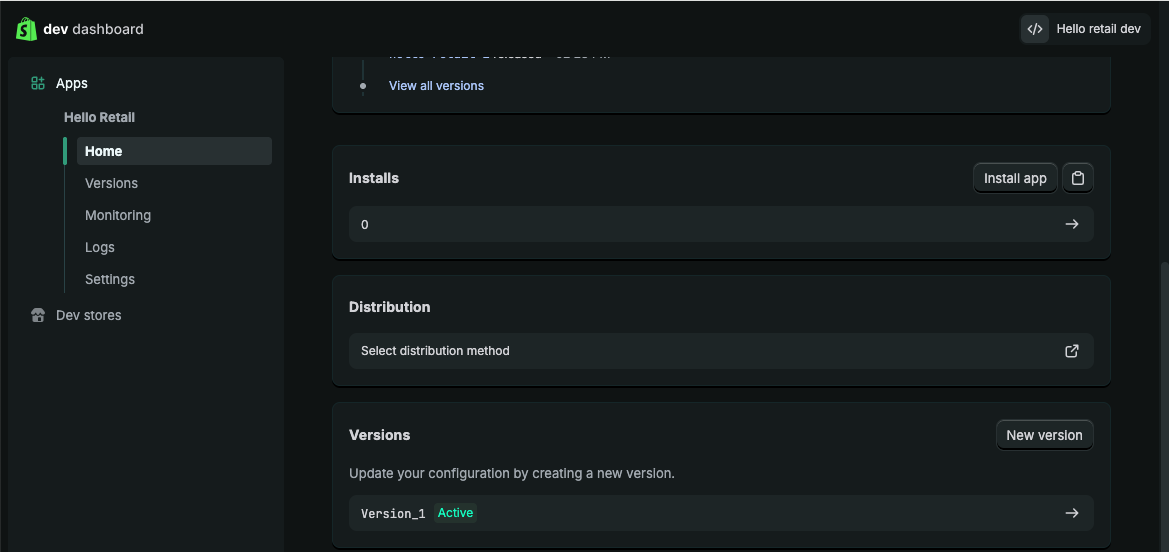 11. Click the install button on the next view to finish the installation.
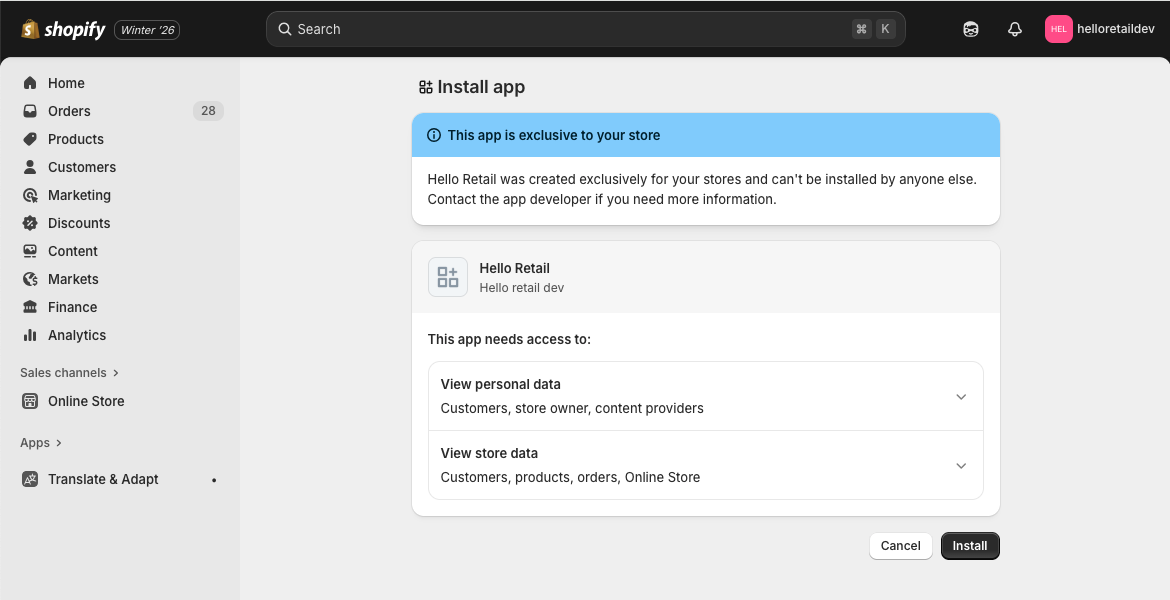
Finishing setup in Hello Retail
- Back in your Hello Retail setup, confirm that you've installed the app, then paste in the Client ID and Secret you copied in step 9.
- Select the market or country for this storefront, so Hello Retail knows which market this connection applies to.
- Click Verify connection. Hello Retail sets up the connection to Shopify and starts creating feeds with the default settings, syncing your products in the background. This can take a while, so feel free to carry on with the rest of setup while it finishes.
Tips & Tricks
If you're missing the right access, you won't see some of the settings needed to complete this section. When that happens, Hello Retail gives you a message you can send to a colleague with store admin access, so you don't need to track down the right Shopify role yourself.
Inserting the helloretail.js script
This section shows how to insert the Hello Retail script on your pages.
Log into the Admin panel of your Shopify webshop: shopify.com/login.
Setting up the Product Agents free trial?
Copy the snippets shown in your Hello Retail onboarding instead of the ones in steps 6 and 7. They're already filled in for your store. See Self-Service Setup.
Watch a short video that walks through inserting the browse tracking script, or follow the written steps below.
- On the dashboard, open the left-hand menu and click Online Store.

- From the drop-down menu, click Themes.

- On the right-hand side of your active theme, click Actions.

- From the drop-down menu, click Edit code.

- In the left menu, open the Layout folder and click theme.liquid. An editor window will open.

- In the editor, scroll to the bottom and locate the closing
</head>tag.
Copy the following snippet and paste it on a new line directly above the closing tag. - In the editor, scroll to the bottom and locate the closing
</body>tag.
Copy the following snippet and paste it on a new line directly above the closing tag.<script> let hr_initParams = {}; if (Shopify.country) { switch (Shopify.country) { case "US": hr_initParams.websiteUuid = "YOUR_US_WEBSITE_UUID"; break; case "DK": hr_initParams.websiteUuid = "YOUR_DK_WEBSITE_UUID"; break; } if (hr_initParams.websiteUuid && hr_initParams.websiteUuid.startsWith("YOUR_")) { delete hr_initParams.websiteUuid; } } if (Shopify.customerPrivacy) { let hr_trackingIsAllowed = Shopify.customerPrivacy.analyticsProcessingAllowed() && Shopify.customerPrivacy.marketingAllowed(); if (!hr_trackingIsAllowed) { hr_initParams.trackingOptOut = true; } } if (Shopify.currency && Shopify.currency.active && Shopify.currency.rate) { sessionStorage.setItem('hello_retail_currency', JSON.stringify(Shopify.currency)); } window.hrq = window.hrq || []; hrq.push(["init", hr_initParams]); document.addEventListener("visitorConsentCollected", (event) => { let hr_trackingIsAllowed = Shopify.customerPrivacy.analyticsProcessingAllowed() && Shopify.customerPrivacy.marketingAllowed(); hrq = window.hrq || []; hrq.push(function(sdk) { sdk.setTrackingOptOut(!hr_trackingIsAllowed); }); }); hrq.push(function(sdk) { if (sessionStorage.getItem('hr_cart_attrs_set')) return; if (sdk.getTrackingOptOut()) return; sdk.getTrackingUserId(function(hr_userId) { const hr_context = window.location.origin + (Shopify.routes?.root || '/'); fetch('/cart/update.js', { method: 'POST', headers: { 'Content-Type': 'application/json' }, body: JSON.stringify({ attributes: { hr_trackinguser: hr_userId, hr_context: hr_context } }) }).then((response) => { if (response.ok) { sessionStorage.setItem('hr_cart_attrs_set', '1'); } }); }); }); </script>
Note
The websiteUuid selection based on Shopify.country is only required if your Hello Retail setup uses separate websites per market or language. Shopify can serve multiple languages on one domain, but Hello Retail requires separate websites. If your configuration is single market or language, you can ignore this section. You can use Shopify.locale instead of Shopify.country if that aligns with your Hello Retail configuration. If you do not update this code, the script will fall back to the default websiteUuid.
Note
The hr_trackingIsAllowed variable uses the combined result of Shopify.customerPrivacy.analyticsProcessingAllowed and Shopify.customerPrivacy.marketingAllowed. Update this logic if your consent model differs. Other available checks include Shopify.customerPrivacy.marketingAllowed and Shopify.customerPrivacy.saleOfDataAllowed.
Lastly, go to the top of the screen and click Save.

Inserting the Hello Retail tracking pixel
This section enables cart and conversion tracking for Hello Retail. This data improves algorithms, content relevance, and features such as triggered emails.
Setting up the Product Agents free trial?
Copy the pixel code shown in your Hello Retail onboarding instead of the snippet below. It's already filled in for your store. See Self-Service Setup.
Watch a short video that walks through installing the tracking pixel, or follow the written steps below.
Note
If you are updating an existing installation, remove the old scripts first. See: Remove old Shopify scripts
- While logged in as Admin, click Settings at the bottom of the left-hand menu.
In the settings pop-up, open Customer events and click Add custom pixel in the top right corner.
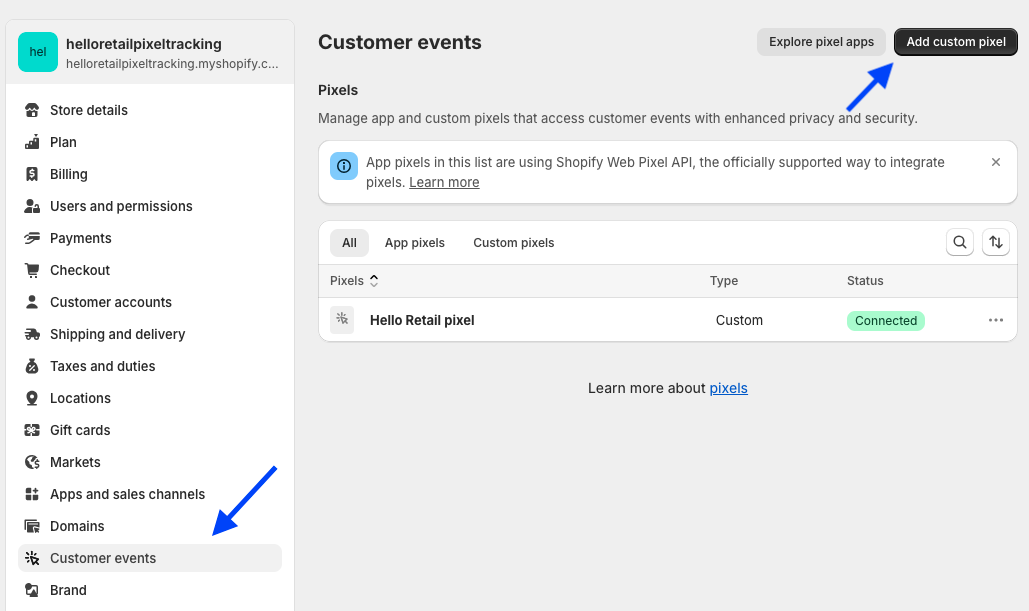
In the pop-up, enter a name such as "Hello Retail Pixel" and click Add Pixel. -
Copy the code snippet below and paste it into the code field for your new custom pixel. Click Save when done.
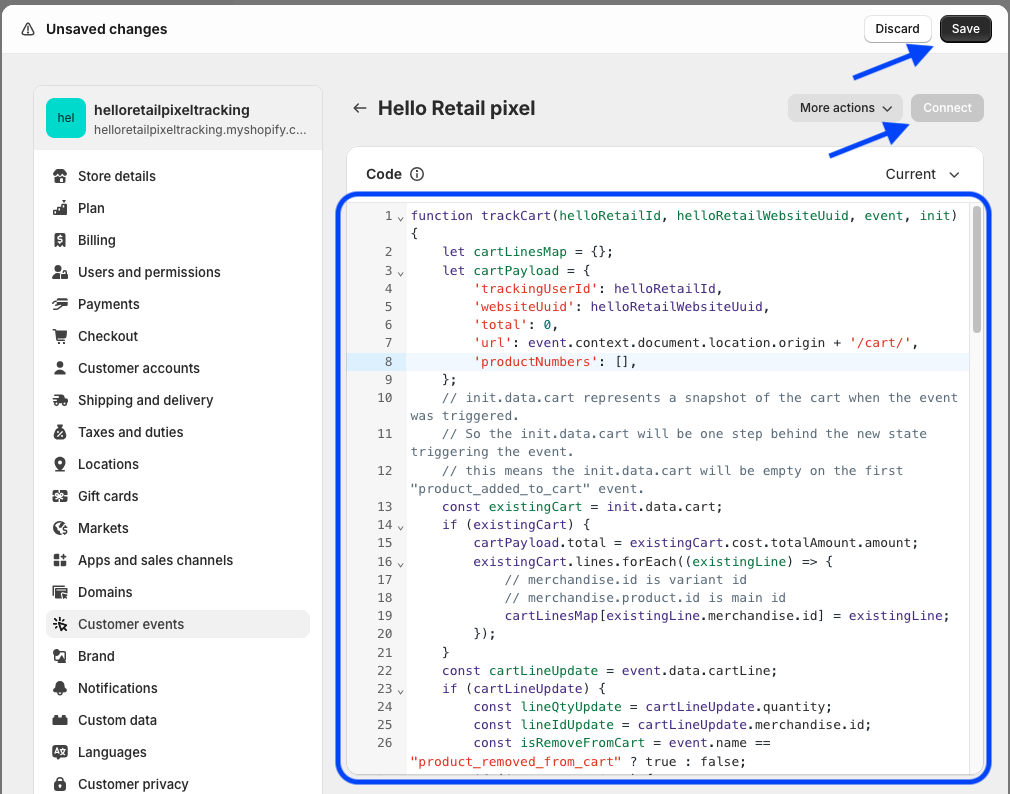
function trackCart(helloRetailId, helloRetailWebsiteUuid, helloRetailCurrency, event, init) { let cartLinesMap = {}; let cartPayload = { 'trackingUserId': helloRetailId, 'websiteUuid': helloRetailWebsiteUuid, 'total': 0, 'url': event.context.document.location.origin + '/cart/', 'productNumbers': [], }; const existingCart = init?.data?.cart; const existingTotalAmount = existingCart?.cost?.totalAmount; let currencyCode = null; if (existingCart?.lines && existingTotalAmount?.amount != null) { cartPayload.total = existingTotalAmount.amount; currencyCode = existingTotalAmount.currencyCode; existingCart.lines.forEach((existingLine) => { cartLinesMap[existingLine.merchandise.id] = existingLine; }); } const cartLineUpdate = event?.data?.cartLine; const lineTotalAmount = cartLineUpdate?.cost?.totalAmount; const lineQtyUpdate = cartLineUpdate?.quantity; const lineIdUpdate = cartLineUpdate?.merchandise?.id; if (lineTotalAmount?.amount != null && lineQtyUpdate != null && lineIdUpdate != null) { currencyCode = lineTotalAmount.currencyCode; const isRemoveFromCart = event.name == "product_removed_from_cart" ? true : false; if (isRemoveFromCart) { if (lineIdUpdate in cartLinesMap) { cartLinesMap[lineIdUpdate].quantity -= lineQtyUpdate; if (cartLinesMap[lineIdUpdate].quantity <= 0) { delete cartLinesMap[lineIdUpdate]; } } cartPayload.total -= lineTotalAmount.amount } else { if (lineIdUpdate in cartLinesMap) { cartLinesMap[lineIdUpdate].quantity += lineQtyUpdate; } else { cartLinesMap[lineIdUpdate] = cartLineUpdate; } cartPayload.total += lineTotalAmount.amount } } Object.values(cartLinesMap).forEach((currentCartLine) => { cartPayload.productNumbers.push(currentCartLine.merchandise.product.id) cartPayload.url += (currentCartLine.merchandise.id + ":" + currentCartLine.quantity + ","); }); if (helloRetailCurrency && helloRetailCurrency.code == currencyCode) { cartPayload.total = Number(cartPayload.total / helloRetailCurrency.rate).toFixed(2); } else { delete cartPayload.total; } fetch('https://core.helloretail.com/serve/collect/cart', { method: 'POST', headers: { 'Content-Type': 'text/plain' }, body: JSON.stringify(cartPayload), keepalive: true, }); } function trackConversion(helloRetailId, helloRetailWebsiteUuid, helloRetailCurrency, event) { const checkoutData = event?.data?.checkout; const subtotalPrice = checkoutData?.subtotalPrice; const subtotalAmount = subtotalPrice?.amount; const origin = event?.context?.document?.location?.origin || ''; if (checkoutData?.order?.id != null && Array.isArray(checkoutData?.lineItems) && subtotalAmount != null && checkoutData?.email != null) { const currencyMatches = helloRetailCurrency && helloRetailCurrency.code == subtotalPrice.currencyCode; const totalInBaseCurrency = currencyMatches ? Number(subtotalAmount / helloRetailCurrency.rate).toFixed(2) : null; let products = []; checkoutData.lineItems.forEach((lineItem) => { const productNumber = lineItem?.variant?.product?.id; const productUrl = lineItem?.variant?.product?.url; const quantity = lineItem?.quantity; const variantPriceAmount = lineItem?.variant?.price?.amount; if (productNumber == null || productUrl == null || quantity == null) { return; } products.push({ 'productNumber': productNumber, 'url': origin + productUrl, 'quantity': quantity, 'lineTotal': currencyMatches && variantPriceAmount != null ? Number(variantPriceAmount / helloRetailCurrency.rate).toFixed(2) : null }) }); const conversionPayload = { 'trackingUserId': helloRetailId, 'websiteUuid': helloRetailWebsiteUuid, 'total': totalInBaseCurrency, 'orderNumber': checkoutData.order.id, 'email': checkoutData.email, 'products': products } fetch('https://core.helloretail.com/serve/collect/conversion', { method: 'POST', headers: { 'Content-Type': 'text/plain' }, body: JSON.stringify(conversionPayload), keepalive: true, }); } } function trackCustomerEmail(helloRetailId, helloRetailWebsiteUuid, event) { const checkoutData = event?.data?.checkout; if (checkoutData?.email) { const trackingUserPayload = { 'trackingUserId': helloRetailId, 'websiteUuid': helloRetailWebsiteUuid, 'email': checkoutData.email, } fetch('https://core.helloretail.com/serve/collect/customerEmail', { method: 'POST', headers: { 'Content-Type': 'text/plain' }, body: JSON.stringify(trackingUserPayload), keepalive: true, }); } } function safeJsonParse(value) { try { return JSON.parse(value); } catch { return null; } } async function getWebsiteUuid(browser) { const helloRetailState = await browser.sessionStorage.getItem('hello_retail_state'); let helloRetailWebsiteUuid = null; if (helloRetailState) { const helloRetailStateJSON = safeJsonParse(helloRetailState); helloRetailWebsiteUuid = helloRetailStateJSON?.website?.uuid || null; } return helloRetailWebsiteUuid; } async function getHelloRetailId(browser) { return (await browser.cookie.get('hello_retail_id')) || null; } async function getHelloRetailCurrency(browser) { const currency = await browser.sessionStorage.getItem('hello_retail_currency'); if (!currency) { return null; } const currencyObj = safeJsonParse(currency); if (!currencyObj) { return null; } return {"rate": currencyObj.rate, "code": currencyObj.active}; } analytics.subscribe('product_added_to_cart', async (event) => { const helloRetailId = await getHelloRetailId(browser); const helloRetailWebsiteUuid = await getWebsiteUuid(browser); const helloRetailCurrency = await getHelloRetailCurrency(browser); if (helloRetailId && helloRetailWebsiteUuid) { trackCart(helloRetailId, helloRetailWebsiteUuid, helloRetailCurrency, event, init); } }); analytics.subscribe('product_removed_from_cart', async (event) => { const helloRetailId = await getHelloRetailId(browser); const helloRetailWebsiteUuid = await getWebsiteUuid(browser); const helloRetailCurrency = await getHelloRetailCurrency(browser); if (helloRetailId && helloRetailWebsiteUuid) { trackCart(helloRetailId, helloRetailWebsiteUuid, helloRetailCurrency, event, init); } }); analytics.subscribe('checkout_started', async (event) => { const helloRetailId = await getHelloRetailId(browser); const helloRetailWebsiteUuid = await getWebsiteUuid(browser); const helloRetailCurrency = await getHelloRetailCurrency(browser); if (helloRetailId && helloRetailWebsiteUuid) { trackCart(helloRetailId, helloRetailWebsiteUuid, helloRetailCurrency, event, init); } }); analytics.subscribe('checkout_contact_info_submitted', async (event) => { const helloRetailId = await getHelloRetailId(browser); const helloRetailWebsiteUuid = await getWebsiteUuid(browser); if (helloRetailId && helloRetailWebsiteUuid) { trackCustomerEmail(helloRetailId, helloRetailWebsiteUuid, event); } }); analytics.subscribe('checkout_completed', async (event) => { const helloRetailId = await getHelloRetailId(browser); const helloRetailWebsiteUuid = await getWebsiteUuid(browser); const helloRetailCurrency = await getHelloRetailCurrency(browser); if (helloRetailId && helloRetailWebsiteUuid) { trackConversion(helloRetailId, helloRetailWebsiteUuid, helloRetailCurrency, event); } await browser.sessionStorage.removeItem('hr_cart_attrs_set'); }); -
Set the appropriate customer privacy settings and click Connect to publish the tracking pixel.
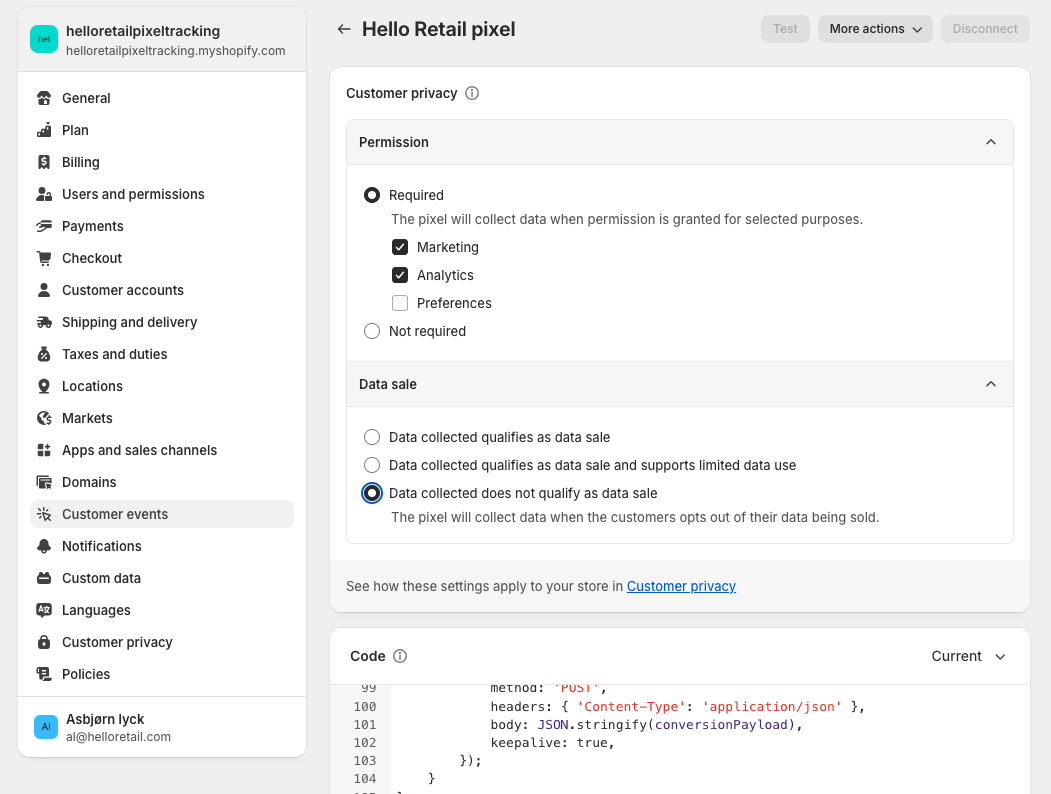
Note
If you removed an older installation before this step, make sure to follow this section to insert the general tracking script on your webshop.
Creating a blank page for Hello Retail search
Note
This section only applies if you're setting up full search.
- Go to Online store.

- Click the sub-menu Pages.

- Click Add pages in the top right corner. A new page editor appears.

- In the page editor, write a clear title, such as "Search results". Make sure Visible is selected under Visibility. Choose page under Template.
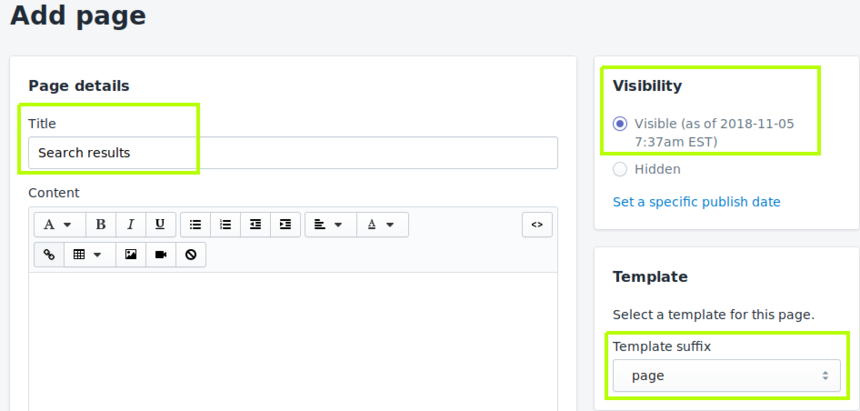
- Go to the bottom right corner and click Save.

- You've now created a blank page for Hello Retail to display search results. After saving, go to the top of the page and click View Page. This opens a new browser tab.

- Copy the page URL from your browser and share it with Hello Retail so we can finish setting up your full-page search.

Configure webshop
After completing the platform installation and onboarding flow, configure your webshop. Follow this guide:
Updating your Shopify integration
The steps for updating your Hello Retail Shopify integration depend on the version of your current setup.
Legacy integration (no tracking pixel)
If your integration uses a script in the "Additional Scripts" field of the checkout.liquid page (no tracking pixel):
- Follow the Remove old Shopify scripts guide to remove the legacy integration.
- Then follow this guide from the beginning to install the latest version.
Older version of current integration (with tracking pixel)
If you are already using a tracking pixel but need to update:
-
API Credentials:
See the Creating API Credentials for Hello Retail section above. Ensure your API credentials include all required scopes. -
helloretail.js script:
Verify the embedded script matches the latest version in this guide. Copy and replace to ensure accuracy. -
Tracking Pixel:
Ensure the tracking pixel implementation matches the current documentation. Copy and replace to update safely.