 Avg. 8 min read
 WooCommerce Installation Guide

woocommerce-hello-retail-1.2.39
Install the Hello Retail WooCommerce Plugin
This guide explains how to install the Hello Retail plugin for WooCommerce.
To integrate Hello Retail with your WooCommerce webshop, follow the steps below.
Steps
-
Log in to your WooCommerce Admin.
-
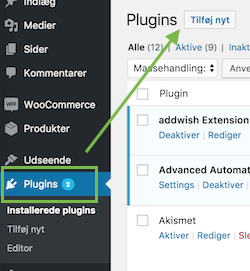
In the dashboard, go to the left-hand menu. Select Plugins, then click Add New.
-
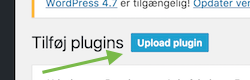
Click Upload Plugin.
- Download the Hello Retail plugin for WooCommerce here - current version 1.2.39. The file is also attached in this guide.
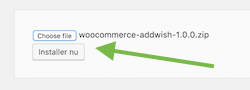
Choose the file from your disk/computer and Install the plugin:
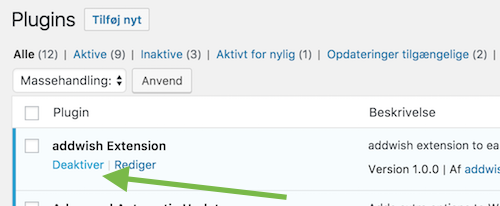
- After installation, click Activate on the Hello Retail plugin in the Plugins list.
-
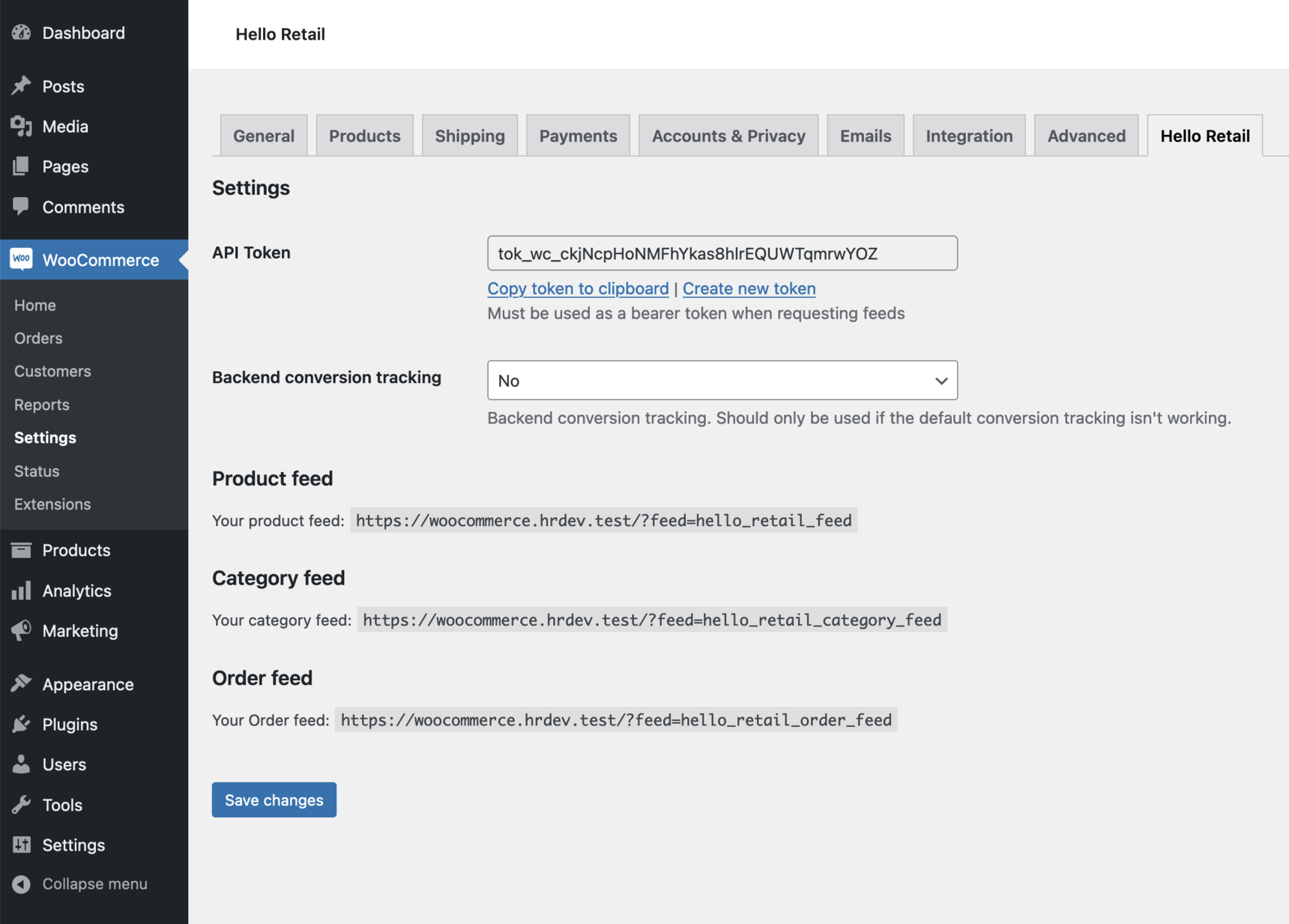
The plugin restricts access to the product, order, and category feeds using an API token. After installation, the token is shown in the plugin settings. Add this token to your feed configuration in My Hello Retail.
- If you manage your own feeds, configure the feed with Bearer token authorization. See "Adding a request header to a feed" in the feed configuration tool.
- If Hello Retail manages your feeds, send the token to Support and we will configure it for you.
Provide product prices for the feed by filter hook.
(Optional) From version 1.2.30, you can provide product prices for the product feed by hooking into the "hello_retail_product_price_hook" filter. This filter is called once per product while the feed is generated.
Here is an example of how to hook in and the expected return format:
add_filter("hello_retail_product_price_hook", "get_price_for_hello_retail", 1, 1);

function get_price_for_hello_retail($product) {
    return array(
        "price" => some_function_to_get_price($product),
        "oldPrice" => some_function_to_get_regular_price($product),
        "priceRangesTo" => some_function_to_get_max_range_price($product),
    );
}
Note
- priceRangesTo is optional and should be set only for products that display a price range.
- Prices must be returned as floats or numeric strings. Do not return HTML.
Create a blank search page
Hello Retail Dynamic Search requires a blank page on your site where search results can be rendered.
You can see an example of an empty search page here. You can read more about the blank page and Dynamic Search here.
Steps - Create a new blank search page in Wordpress (WooCommerce)
- Log in to your WP Admin.
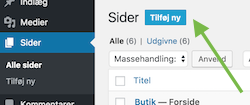
- Go to Pages > Add new page.
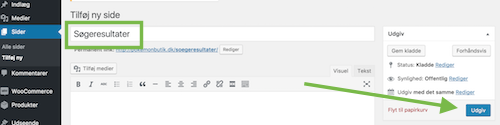
- Enter a clear page name, for example "Search results", and publish the page.
- Make sure this page does not appear in your webshop navigation. This depends on how page navigation is implemented on your site. Pages do not normally appear by default.
- Send the URL of your blank search page to support@helloretail.com.
Updating the Hello Retail Module - WooCommerce
If you use the Hello Retail plugin on WooCommerce, we recommend updating when we fix bugs or change services that the plugin integrates with.
Updating the plugin means uninstalling the old version and installing the new version.
Steps - Update the Hello Retail Module
- Log in to your WooCommerce Admin.
-
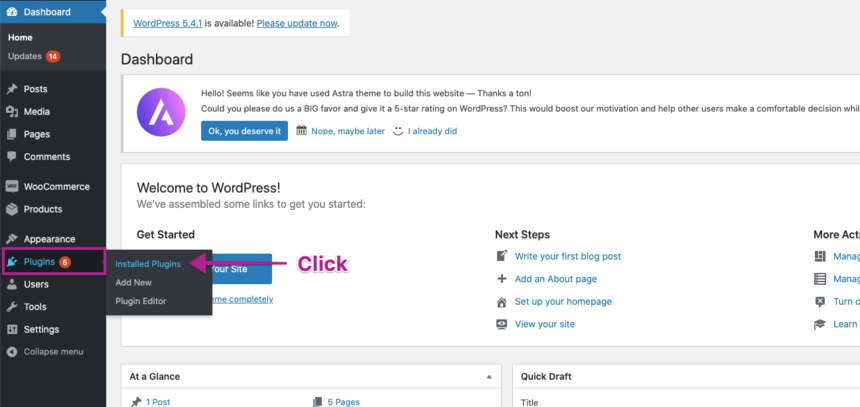
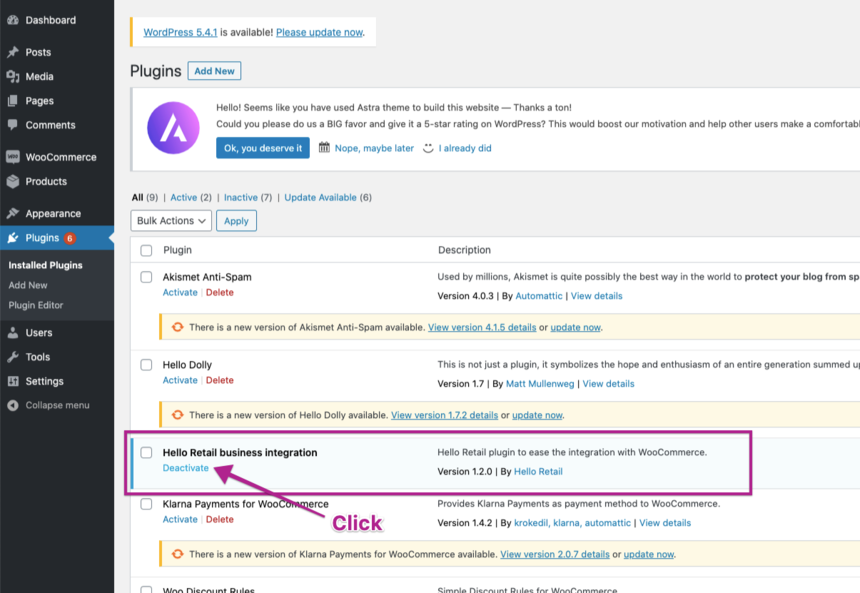
In the dashboard, go to Plugins > Installed Plugins to see your installed plugins.
-
In the list, locate Hello Retail business integration and click Deactivate.
-
After deactivation, click Delete.
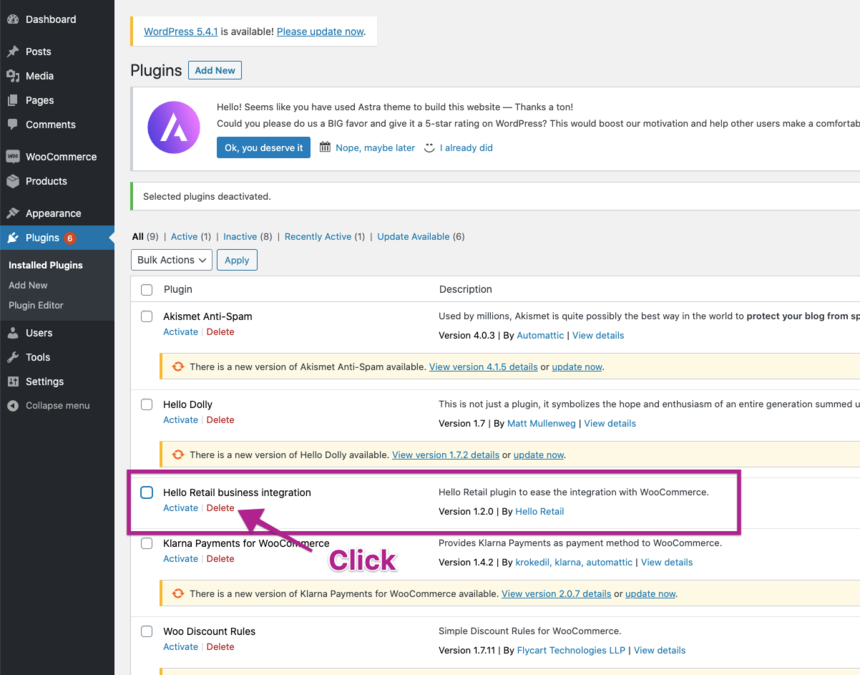
When the plugin is deleted, install the updated plugin as a fresh installation.
You can find the complete installation guide here.
Configure Webshop
After installing the plugin and completing the onboarding flow, configure your webshop. Follow this guide:
Change Log
Version 1.2.39 (2025-12-16)
- Fix missing parameter in print_simple_variant_attribute function.
Version 1.2.37 (2025-11-27)
- Add additional product variant info to the product feed.
Version 1.2.36 (2025-03-12)
- Provide product quantity and line total to Hello Retail when tracking conversions.
Version 1.2.35 (2024-10-31)
- Include both attribute name and attribute slug in product feed.
Version 1.2.34 (2024-07-10)
- Change how the plugin handles access to the three feed types, instead of relying on IP address verification.
Version 1.2.32 (2024-05-28)
- Fix minor issue that could cause PHP warnings.
Version 1.2.31 (2024-02-05)
- Update price helper with improved handling of various formatting settings.
Version 1.2.30 (2024-01-23)
- Add a custom filter for developers to hook in and provide product prices for the feed.
Version 1.2.29 (2024-01-17)
- Redesign helper function to extract prices from priceHtml and filters.
Version 1.2.28 (2023-12-05)
- Add option to enable backend conversion tracking if conversion tracking is not working for some payment methods.
- Fix minor issues that would cause PHP warnings.
Version 1.2.27 (2023-11-23)
- Make sure we do not output a thousands separator.
Version 1.2.26 (2023-11-22)
- Remove partnerId input field from admin.
- Update script and tracking implementation to new standard.
Version 1.2.25 (2023-11-13)
- Improved price helper and include option to output prices for debug (internal).
- Add support for HPOS.
Version 1.2.24 (2023-10-20)
- Add new field to product feed containing product category IDs, including parent category IDs.
Version 1.2.23 (2023-09-25)
- Add productTerms and customAttributes tags to the product feed.
- Add product created and updated date in the product feed.
- Add endpoint for content feed.
- Add updated info endpoint.
Version 1.2.22 (2023-05-17)
- Fix issue where a product that had once been variable but is now simple would include attributes from the variations.
Version 1.2.21 (2023-04-19)
- Fix issue that caused problems with including tax on prices in all cases.
Version 1.2.20 (2023-04-14)
- Make the product feed handle products without prices gracefully.
Version 1.2.19 (2023-03-28)
- Redo how we get prices for products.
- Remove a few plugin-specific helpers that are not needed since the price calculation is now better.
Version 1.2.18 (2023-03-16)
- Add our IP as default IP restriction.
Version 1.2.17 (2022-10-12)
- Add country to order feed.
Version 1.2.16 (2022-09-27)
- Only get variant attributes from variants in stock.
- Add categoryIds to the product feed.
- Add specific support for the WooCommerce Multi-Language plugin.
Version 1.2.13 (2021-12-09)
- Handle if fixed price is set using comma as a thousands separator for WPC component.
Version 1.2.12 (2021-12-09)
- Fix a few places where comparing string 0 would unintentionally return false.
Version 1.2.11 (2021-12-07)
- Do not use empty() when a valid value can be 0.
Version 1.2.5 (2021-08-11)
- Fix composite product might be null and not "null".
- Use isset instead of !isnull.
Version 1.2.3 (2020-11-18)
- Fix minor issues that would cause PHP notices.
- Prevent empty variant SKU from breaking product feed.
Version 1.2.1 (2020-09-11)
- Update attribute value in CDATA now that it is not escaped anymore.
Version 1.1.19 (2019-11-19)
- Add visibility field to feed.
Version 1.1.16 (2019-05-24)
- Improved way of getting products.
- Change image size to the one used by the current WooCommerce theme.
- Exclude categories for simple feed option.
Version 1.1.14 (2019-04-10)
- Add tags to simple feed format.
- Add simpleFeed option.
Version 1.1.13 (2019-04-01)
- Version bump to 1.1.13.
- Check product is published before attempting to include it in feed.
- Use different function to get composite price.
Version 1.1.12 (2019-03-29)
- Restructure everything regarding getting product prices.
Version 1.1.7 (2019-01-10)
- Make sure we do not include refunds in the order feed.
Version 1.1.6 (2018-12-07)
- Add support for IP restriction.
- Add better error handling in feeds.
Version 1.1.5 (2018-11-26)
- Add proper pagination support for product and category feeds.
- Add SKU to product feed.
- Add support for the brand discount module.
Version 1.1.3 (2018-03-23)
- Strip out illegal characters from product data when writing the feed.
Version 1.1.2 (2018-03-22)
- Replace usage of the deprecated method get_currentuser() with wp_get_current_user().
Version 1.1 (2017-12-22)
- Make the plugin work with WooCommerce 3.2.
- Move source files into src/ directory for packaging.
Version 1.0.3 (2017-12-21)
- Fix feed limit issue.
- Add cart span.
Version 1.0.2 (2017-12-15)
- Fix feed limit.
Version 1.0.1 (2017-12-15)
- Info endpoint added.
Version 1.0.0 (2017-12-13)
- Initial Release.