 Avg. 3 min read

Adding extra product data to your Product Agent messages
Every Product Agent message includes a standard set of product fields, such as title, image, price and stock status. With Product extraData you can add more fields from your product feed, so your emails can show things the standard set doesn't cover.
Common examples:
- A stock badge, such as "Low stock" or "Back in stock"
- An alternative image, for example a model photo
- A second price, such as a member price or price per unit
- Sizes, pairings, style or any other field you send in your feed
Product extraData is available on Klaviyo and webhook channels. It is optional.
Choose your extra fields
- Go to Product Agents and open your channel card (Klaviyo or webhook).
- On the Product extraData row, click Customize.
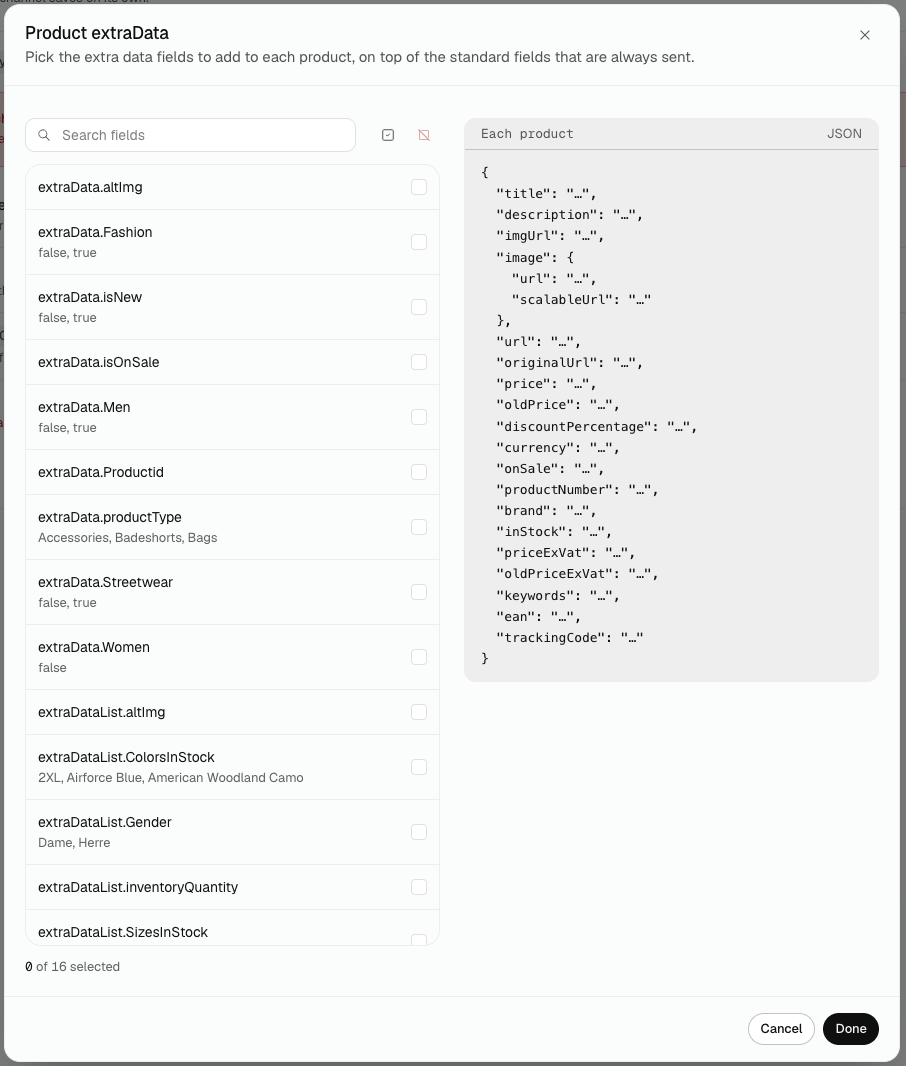
- Search for a field, or scroll the list. Under each field name you'll see a few sample values from your feed.
- Tick the fields you want to add.
- Click Done, then click Save changes on the channel card.
Done doesn't save
Done closes the window. Your picks are stored only when you click Save changes on the channel card.
Messages only include extra data once you have selected it here. Until then, only the standard fields are sent.
Preview what the channel receives
The panel on the right shows one product as the channel would receive it. The standard fields that are always sent are listed first, so you can see what you are adding on top.
Good to know
- You can add up to 25 extra fields per channel.
- Each channel keeps its own list. If you have two Klaviyo channels, set them up separately.
- If a field you saved is later removed from your feed, it stays in the picker so you can untick it.
Tips & Tricks
Start with the one or two fields you need, such as an alt image or a stock status. A short list is easier to maintain than 25 fields you never use.