 Avg. 2 min read
 Tracking Searches in Google Analytics
With every Hello Retail product and service, you can collect data and insights to track performance and optimize results. If you use Google Analytics, you can track similar data and integrate it with your analytics setup.
Event Tracking
When you use Hello Retail Search with Google Analytics event tracking enabled, you can track search counts and search result clicks directly in Google Analytics.
In Google Analytics, these events are sent as classic event tracking with the following meta data:
| Category | Hello Retail |
|---|---|
| Action | action type (Search or Click) |
| Label | search type used (Instant, Infinite, Full or Overlay search) |
Here you can also learn more about the Dynamic search statistics.
This mapping applies to Universal Analytics. In GA4, search interactions are tracked as events with parameters rather than category, action, and label.
Google Analytics Site Search
You can configure Google Analytics Site Search to work with Hello Retail Search.
Follow these steps in Google Analytics:
When logged in, go to: Admin -> View -> View Settings.
Enable Site search Tracking by toggling it to ON.
Specify the keyword used in your search URLs as the Query parameter.
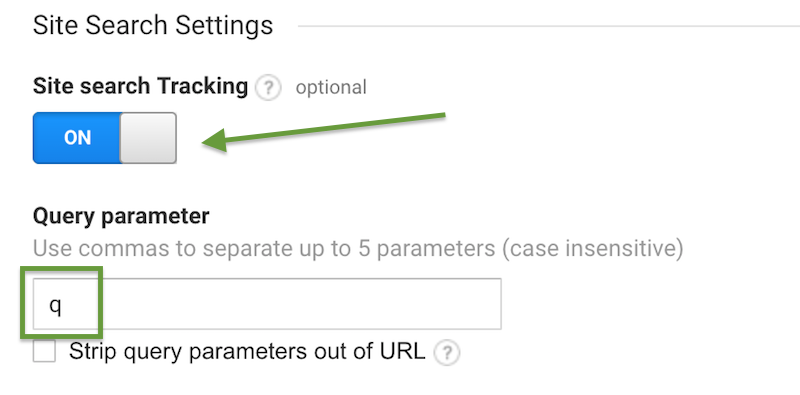
Here is an example of how to identify the keyword used in your search URL:
