 Avg. 2 min read
 How to reactivate customers who haven't bought in a while
A good way to reactivate inactive customers is to send an email with relevant products if a customer hasn't purchased at your webshop for the last 90 days.
You can do this in Hello Retail using Triggered Emails. Follow these steps:
- Start by creating a Triggered Email design for post-conversion. If you haven't done this before, follow this guide. Go to the next step once you have created the design.
- Click on "Triggered Emails" in the menu and choose "Post-conversion".
- Click "Create new trigger".
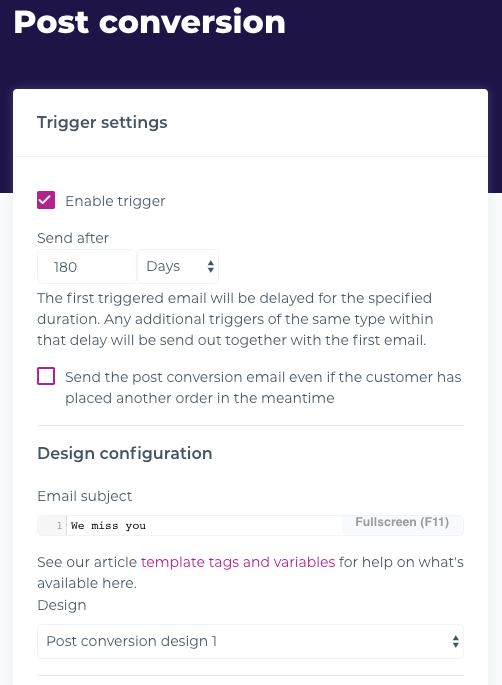
- Enable the trigger.
- Set "Send after" to the delay after the customer's last order. Avoid sending too soon; we recommend 90 to 180 days.
- Choose a suitable title.
- Ensure that "Send the post-conversion email even if the customer has placed another order in the meantime" is set to off. The email should only be sent if no new order was placed during the delay.
- Choose a design and click "Next".
If you sell products that customers buy on a recurring basis such as consumer goods like coffee, shampoo, or pens, then use the following steps:
- Delete the default steps in the algorithm.
- In the drop-down "Add another step", choose the algorithm "Recently bought" and click "Save".
Otherwise choose the following steps:
- Remove the step "Bought together".
- Click "Save".
Ensure that the email trigger is enabled.
You have now added a post-conversion Triggered Email that will be sent to customers who haven't purchased at your website in a while. This campaign targets lapsed buyers.